Open YouTube, and within a few videos, you will inevitably see a VPN ad. Some promise "instant global connection with zero buffering," others pitch "cheap lifetime memberships for unlimited devices," and many claim to "unlock regional YouTube content worldwide." These ads are everywhere, making these services look like an absolute steal—but they often hide significant catches.
Are the heavily advertised VPNs on YouTube, like NordVPN and ExpressVPN, actually worth your money?
This article pulls back the curtain on VPN affiliate marketing, breaks down the three major traps to avoid, and provides a simple 3-step vetting guide to help you find a truly secure, stable, and verified no-logs VPN.
Why Trust This Guide?
Unlike standard YouTube ads, we aren't here to push a 60-second script. Our team independently tested the most aggressively marketed VPNs over a 6-month period, analyzing their server latency, hidden refund terms, and real-world streaming performance. We buy our own subscriptions to ensure our reviews remain unbiased.
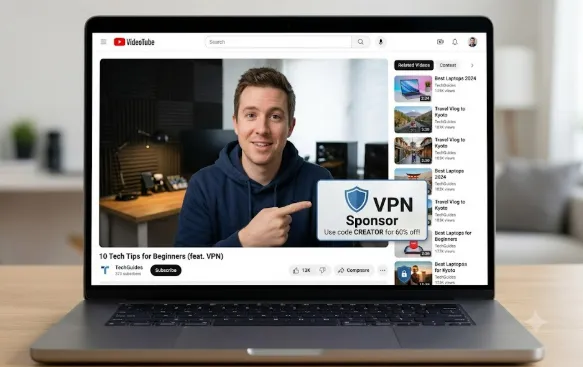
Why Is YouTube Flooded with VPN Ads?
Before we look at the red flags, it is important to understand the business model: Affiliate Marketing.
Most YouTubers recommend these VPNs because they receive a 30% to 70% commission when viewers purchase through their custom links. High ad visibility does not mean a product is flawless; it simply means the brand has a massive marketing budget.
The 3 Most Common Types of Advertised VPNs
Not all VPNs featured in YouTube ads are created equal. They generally fall into three categories, each with different target audiences and risk profiles:
1. The Budget Bait (Focus: Ultra-Low Price)
-
The Pitch: "$1 for the first month," "Lifetime membership for $99," or similar rock-bottom pricing. These are usually paired with claims of "unlimited simultaneous connections" and "tens of thousands of global servers."
-
The Reality: These are often smaller, lesser-known providers, many of which lack a clear parent company. Some are part of "rebranded families" that share shoddy infrastructure (such as Turbo VPN, VPN Proxy Master, and other closely linked brands), leading to poor speeds and questionable privacy standards.
2. The Feature Hypester (Focus: Niche Use Cases)
-
The Pitch: Heavy emphasis on "seamlessly unlocking Netflix/Disney+," "ultra-low ping for gaming," or "absolute anonymity." The ads often show smooth streaming or high-speed gaming footage.
-
The Reality: These ads target streamers and gamers, but actual performance depends heavily on your local ISP and location. Smaller providers often fail to keep up when streaming platforms block their IPs, rendering their main selling point useless overnight.
3. The Premium Giants (Focus: Security & Reliability)
-
The Pitch: Less focus on bargain prices and more on "military-grade security," "audited no-logs policies," and "consistent connections," occasionally sweetened with exclusive YouTuber bundle discounts.
-
The Reality: These include industry leaders like NordVPN, ExpressVPN, Surfshark, and Proton VPN. These providers undergo regular independent security audits, feature transparent logging policies, and deliver solid performance—though they do come with a higher price tag (and pay out some of the highest commissions to creators).
3 Steps to Vet an Advertised VPN
To cut through the marketing noise, beginners can use these three straightforward benchmarks to evaluate any VPN:
1. Check the Foundations (Jurisdiction & Privacy Policy)
-
Transparent Ownership: Look for a verified parent company, a clear official website, and compliance standards. Avoid "ghost" companies with zero public background.
-
Strict No-Logs Policy: Ensure they explicitly guarantee they do not log your browsing history, IP address, or connection timestamps. This policy must be backed by a reputable independent audit (e.g., Deloitte, PwC). The company should also ideally be registered in privacy-friendly jurisdictions like Panama, Switzerland, or the British Virgin Islands (BVI).
-
Regulatory Compliance: Ensure you understand the local laws in your region. In some jurisdictions, personal or corporate use of VPNs must go through officially approved networks to avoid legal and security risks.
2. Assess Core Performance (Speed, Stability, & Unblocking)
-
Connection Speed: Look for providers that support WireGuard or optimized proprietary protocols (like NordLynx or Lightway) to ensure buffer-free 1080p/4K streaming.
-
Stability: Choose a provider with servers in at least 50 countries and a consistent uptime rate of over 95%, especially during peak hours (8:00 PM to 11:00 PM).
-
Streaming Support: Verify that they can reliably bypass geo-blocks on major streaming platforms like Netflix and Disney+.
-
Risk-Free Trial: Only buy from brands that offer a legitimate "30-day money-back guarantee" so you can test their service risk-free.
-
Did you know a good VPN can actually pay for itself? Beyond security, you can [Use a VPN to Find Cheaper Flights] by bypassing airline dynamic pricing.
3. Spot the Value Traps (Fair Pricing & Vital Features)
-
Avoid "Too Good to Be True" Deals: Be highly suspicious of $99 lifetime memberships or $1 plans. Standard, reliable subscriptions generally cost between $1.50 and $4.50 per month on long-term plans.
-
Essential Security Tools: Never buy a VPN without a built-in Kill Switch (which automatically cuts your internet if the VPN drops to prevent IP leaks) and robust DNS Leak Protection.
-
Value-Adds: A single subscription should allow at least 5 simultaneous device connections (premium brands often support 8+ or unlimited) and offer 24/7 live customer support.
Top 3 YouTube-Advertised VPNs Reviewed: NordVPN, Surfshark, & ExpressVPN
We looked at the three most frequently advertised premium VPNs on YouTube and evaluated them across our core criteria.
Comparison Table
|
Feature / Metric |
|||
|
Main Selling Point |
All-rounder, security features |
Best value, unlimited devices |
Premium speed, simplicity, pricey |
|
Jurisdiction |
Panama (Privacy haven, no mandatory data retention laws) |
Netherlands (EU jurisdiction, but maintains strict no-logs policy) |
British Virgin Islands (BVI, independent legal system, no data retention laws) |
|
No-Logs Audits |
Audited by Deloitte and PwC |
Audited by Deloitte |
Audited by multiple top firms (has withstood real-world legal challenges) |
|
Device Limit |
10 devices |
Unlimited |
14 devices |
|
Speed Retention |
Extremely fast (~90% of base speed) |
Excellent (~80% of base speed) |
Extremely fast (~92% of base speed) |
|
Price Range |
~$3.09 - $6.99/mo (Promo 2-year plan) |
~$1.99 - $4.19/mo (Promo 2-year plan) |
~$2.29 - $4.99/mo (Promo 2-year plan) |
|
Best For |
Users wanting a secure, feature-rich, versatile VPN |
Budget-conscious users and large households |
Users who want premium speeds and a dead-simple interface |
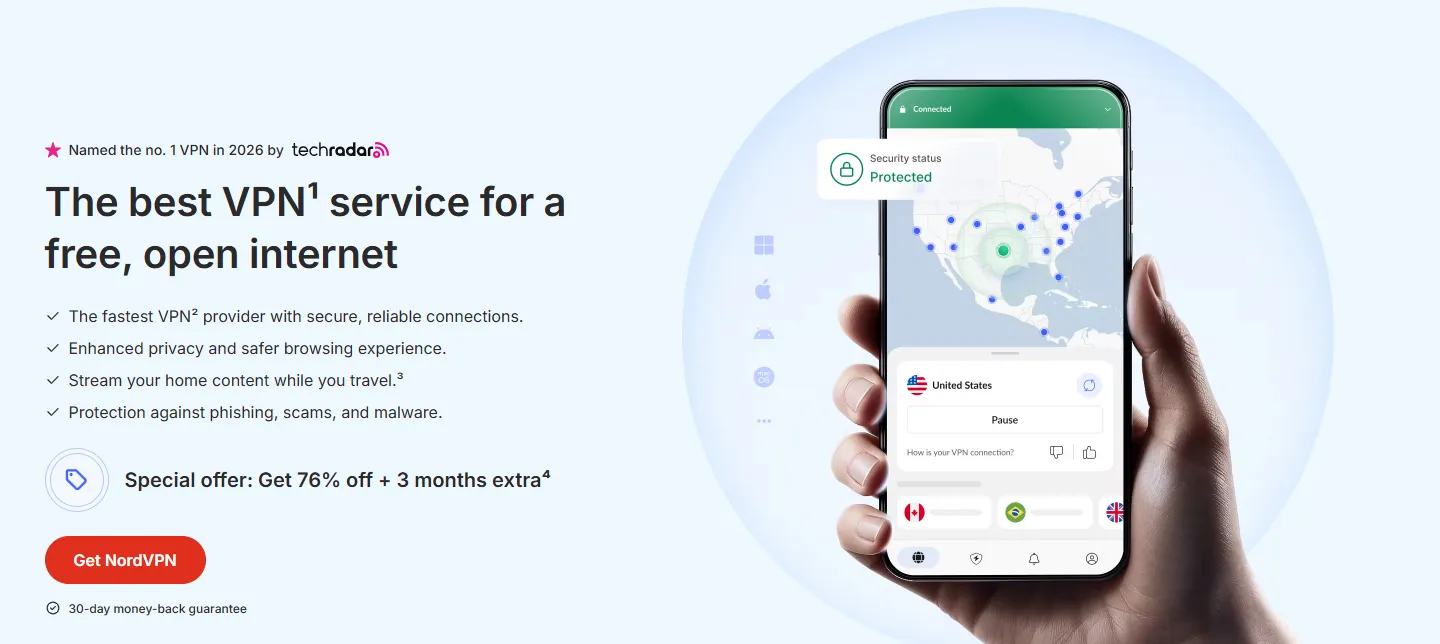
1. NordVPN
-
Positioning: The feature-rich "all-rounder."
-
Average Cost: ~$3.09 - $6.99/month (with a 2-year subscription).
Deep Dive
-
Privacy & Jurisdiction: Headquartered in Panama, which is outside major surveillance alliances and has no data retention laws. Its zero-logs claim has been repeatedly verified by independent audits from PwC and Deloitte.
-
Protocols & Speed: Powered by NordLynx, a custom protocol built on the ultra-fast WireGuard framework. Speed loss during testing was minimal (around 10%), making 4K video playback seamless with near-instant seek times.
-
Security Features: It features a robust, customizable Kill Switch. It also offers "Double VPN" (multihop) for double encryption, and "Threat Protection," which blocks ads, trackers, and malicious sites at the network level.
-
Streaming: Unlocks major streaming services (Netflix, Disney+, Amazon Prime Video) with high reliability. Its "SmartPlay" feature helps bypass VPN blocks seamlessly.
Drawbacks
-
Device Limit: Limited to 10 simultaneous connections.
-
App Interface: The desktop client opens to an interactive world map. This can feel slightly bloated and laggy on older or lower-spec computers.
f you want a deeper look at its performance, check our guide NordVPN Review, then you will get more information on this VPN.
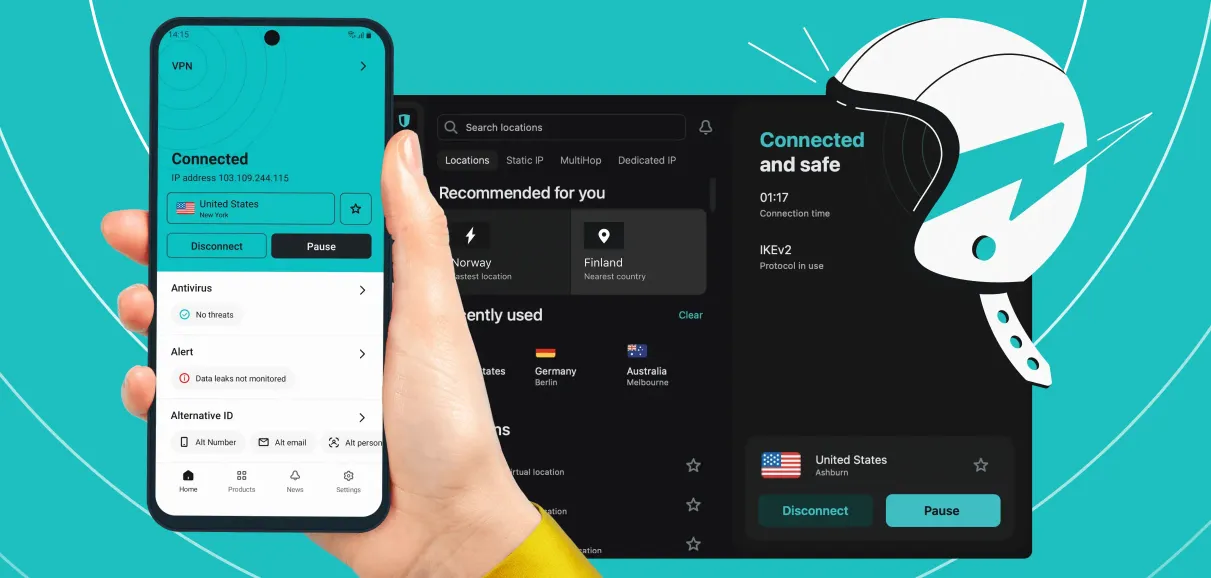
2. Surfshark
-
Positioning: The budget-friendly, family-oriented option.
-
Average Cost: ~$1.99 - $4.19/month (with a 2-year subscription).
Deep Dive
-
Privacy & Jurisdiction: Now based in the Netherlands. While it is under EU jurisdiction, the company maintains a strict, audited zero-logs policy, verified by Deloitte.
-
Protocols & Speed: Native support for the standard WireGuard protocol. While connections to major hubs in the US, Europe, and Asia are fast, we noticed occasional latency spikes and slower speeds during peak evening hours (8:00 PM to 11:00 PM) on some smaller servers.
-
Security Features: Despite its budget price, Surfshark does not compromise on safety. It includes a functional Kill Switch, an ad-blocker ("CleanWeb"), and an "IP Rotator" that automatically changes your IP address every few minutes without disconnecting you from the VPN.
-
Value: Surfshark’s standout feature is unlimited simultaneous device connections. One account can cover your entire household's phones, laptops, tablets, and smart TVs, making the cost per person incredibly low.
Drawbacks
-
Peak-Hour Spikes: Because of its low-price strategy, popular servers can get crowded, leading to occasional speed drops during peak hours.
-
Refund Bureaucracy: While they offer a 30-day money-back guarantee, their support team will often put you through multiple rounds of questions (asking for troubleshooting details or offering discounts) before approving the refund.
If you want a deeper look at its performance, check out our full [Surfshark VPN Review: Best Value VPN with Unlimited Devices], where we break down its WireGuard speeds and family-sharing benefits.
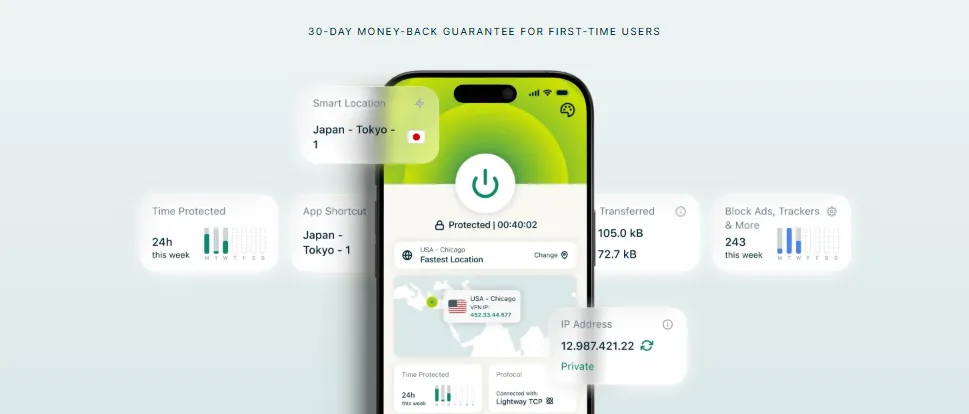
3. ExpressVPN
-
Positioning: The premium, ultra-fast, and dead-simple industry benchmark.
-
Average Cost: ~$2.29 - $4.99/month (with a 2-year subscription).
Deep Dive
-
Privacy & Jurisdiction: Based in the British Virgin Islands (BVI), which has excellent privacy laws. Its no-logs policy has been verified by independent audits and proven in real-world judicial seizures where servers yielded absolutely zero user data.
-
Protocols & Speed: Uses Lightway, a proprietary lightweight protocol. Lightway connects almost instantly (usually in under a second) and has the lowest latency and speed drop among all tested VPNs, making it the gold standard for gaming and high-bitrate 4K/8K streaming.
-
Security Technology: Features TrustedServer technology, meaning all servers run entirely on RAM (volatile memory) rather than hard drives. Every time a server restarts, all data is completely wiped at the hardware level. It also features a highly responsive Kill Switch called "Network Lock."
-
Usability: The interface is clean and minimal, featuring a single, large power button. It has virtually no learning curve. It also remains the most reliable VPN for bypassing strict streaming blocks.
Drawbacks
-
Premium Pricing: It is significantly more expensive than competitors like Surfshark and lacks ultra-cheap 3-year or 5-year plans.
-
Minimalist Feature Set: ExpressVPN focuses purely on core performance and network-level security. It does not offer "extras" like built-in password managers or dark web monitoring.
if you want to get a free trial on ExpressVPN, you can read our guide: How to Get ExpressVPN Free Trial for 7 & 30 Days
4 Major Red Flags in YouTube VPN Sponsorships (How to Avoid Scams)
Many users get swayed by polished YouTube sponsorships, only to end up with a frustrating experience. Watch out for these four common traps:
1. The Low-Price Trap: Cheap Initial Costs, Expensive Renewals
-
"Automatic Renewal" Tricks:
- Ads lure you in with "$1 first-month" trials. However, the fine print often defaults to renewing at standard, premium prices. The opt-out settings are frequently buried deep in account dashboards, and some companies require you to email customer service to cancel.
-
How to Protect Yourself:
- Use PayPal or a virtual credit card (like Privacy.com) to pay. Once the payment goes through, immediately cancel the billing agreement/automatic payment in your PayPal settings to prevent unauthorized renewals.
-
The "Lifetime Subscription" Scam:
- Avoid no-name VPNs offering "Lifetime access for a one-time payment of $99." These are often exit scams. The company pockets the quick cash, runs the servers for a year or two, shuts down, and rebrands under a new name to repeat the cycle.
-
Oversold Bandwidth:
- Cheap VPNs save money by crowding thousands of users onto the same shared-bandwidth server. While it might work fine during off-peak hours, you will experience severe lag, packet loss, and connection drops during evening peak hours.
2. Overhyped Claims: "Perfect Unblocking" & "Total Anonymity"
-
The Cat-and-Mouse IP War:
- Streaming giants like Netflix and Disney+ actively identify and block commercial IP blocks. Cheap VPNs with small IP pools get blacklisted quickly, rendering their streaming claims useless.
-
Device Limit Terminology:
- Some VPNs claim to support "unlimited devices," but their Terms of Service (ToS) forbid simultaneous connections from multiple distinct IP addresses. If you share your account with a friend in another city, your account might get flagged and banned.
-
Fake "No-Logs" Promises:
- Unless a company has its zero-logs policy verified by a reputable third-party audit (like PwC or Deloitte), their "no-logs" claim is just a marketing slogan. Many budget VPNs secretly track, package, and sell user browsing habits to advertisers.
3. Hidden Risks: Refund Loops and Jurisdictional Issues
-
The Mobile App Store Trap:
- Never buy your subscription directly inside the iOS App Store or Google Play Store. App store refund requests are processed by Apple or Google’s automated algorithms, which do not honor the VPN provider's "30-day money-back guarantee." Always sign up and purchase directly through the VPN's official website.
-
"Pro-Rata" Refund Policies:
- Read the refund terms. Some privacy-focused VPNs (like Proton VPN) only offer pro-rata refunds (refunding only the unused portion of your subscription) rather than a full refund.
-
The Five Eyes Alliance:
- If a VPN is registered in a country belonging to the Five, Nine, or Fourteen Eyes Alliance (such as the US, UK, Canada, Australia, or New Zealand), local courts can legally compel them to log and hand over user data, regardless of what their marketing claims.
-
Local Compliance:
- In regions with strict internet censorship, using unapproved bypass tools can carry legal risks. For corporate use, companies should use approved international leased lines and official enterprise solutions.
4. Outdated Protocols: Slow and Insecure Systems
-
Legacy Protocols:
- Cheap VPNs often rely on outdated protocols like PPTP, L2TP/IPSec, or SSTP to save on server maintenance. PPTP is highly insecure, and both PPTP and L2TP have clear traffic signatures that are easily detected and blocked by modern firewalls.
-
Modern Protocols to Look For:
-
WireGuard: The industry standard for speed and efficiency. Its small codebase makes it incredibly fast and lightweight, which is ideal for mobile devices switching between Wi-Fi and cellular networks.
-
OpenVPN: The gold standard for security and bypassing strict firewalls, especially when using TCP mode.
- Proprietary Protocols: (e.g., ExpressVPN's Lightway or NordVPN's NordLynx). These protocols offer top-tier encryption while obfuscating your traffic to look like standard HTTPS connections, making them highly effective at bypassing deep packet inspection (DPI).
-
Final Verdict: Which Sponsored VPNs Are Actually Safe?
To help you make an informed decision, here is a quick classification of YouTube-advertised VPNs:
Green List (Safe to Buy with Pre-tests)
-
Reputable International Brands (e.g., NordVPN, ExpressVPN, Surfshark, Proton VPN):
-
Why: While they advertise heavily, they back up their claims with verified third-party audits, strong encryption standards, and robust performance. They also honor their 30-day money-back guarantees. (Proton VPN also offers a highly reliable, unlimited free tier for basic browsing).
-
-
Verified Mid-Tier Providers:
-
Why: Brands with transparent ownership, positive user reviews, and stable peak-hour performance. Make sure to test them extensively during their refund window before committing to a long-term plan.
-
Red List (Avoid Completely)
-
No-Name "Budget" VPNs:
-
Why: Providers with no clear ownership, no verified address, and sketchy "lifetime deals." They often carry hidden fees, have terrible speeds, and offer non-existent customer support.
-
-
Outdated/Overhyped Services:
-
Why: Services that rely on obsolete protocols like PPTP and make unrealistic claims without offering a trial or refund window.
-
-
Insecure or Log-Sharing Providers:
-
Why: VPNs that have been caught sharing user logs or exposing security vulnerabilities (e.g., Turbo VPN, VPN Proxy Master).
-
-
Unlicensed bypass tools in strict jurisdictions:
-
Why: Tools that operate in a legal gray area without security audits, leaving you vulnerable to data leaks and regulatory penalties.
-
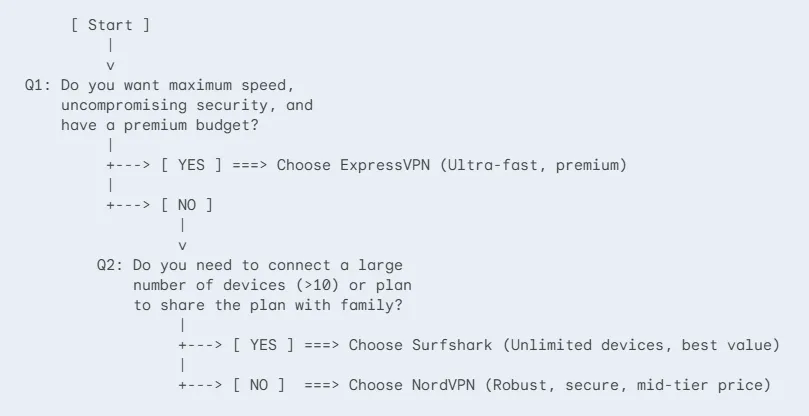
1-Minute Decision Flowchart
Quickly find the right VPN for your needs by answering two simple questions:
The Golden 3-Step Test (Run this during your trial)
Whichever VPN you choose, make sure to perform these three tests within your 30-day money-back guarantee window. If the VPN fails any of them, ask for a refund immediately:
-
The Evening Peak Speed Test:
- Between 8:00 PM and 11:00 PM, connect to a popular server and play a 4K video on YouTube. If it buffers constantly or drops quality, the provider is overselling bandwidth—get a refund.
-
The Streaming Unblocking Test:
- Try watching geo-blocked content on Netflix or Disney+ at different times over three days. If you keep getting "proxy detected" errors across multiple nearby servers, their IP pool is too small—get a refund.
-
The Support & Refund Test:
- Around day 25, contact customer support via 24/7 Live Chat to request a cancellation. Premium providers will process it in under 10 minutes. If they delay, ignore your request, or make it difficult, use it as a warning sign and insist on a refund immediately.
Conclusion: Security and Stability Come First
While YouTube VPN ads are flashy, never compromise on safety and reliability. A good VPN should protect your sensitive data and provide a consistent connection. Spending a few extra dollars on a reputable, independently audited provider is always a better investment than risking your privacy and sanity on a cheap, unreliable service.
Disclaimer: All testing data, privacy evaluations, and pricing details in this article are based on publicly available documentation and specific test environments. Terms of service, pricing, and protocol features may change over time; please verify with the respective provider’s official website.
Frequently Asked Questions (FAQ)
Q1: Will a commercial VPN make me completely anonymous online?
A: No. While a reputable zero-logs VPN hides your traffic and IP address from your Internet Service Provider (ISP), your ISP can still see that you are connecting to a VPN server. Additionally, a VPN cannot protect you from browser fingerprinting (such as Canvas fingerprinting), tracking cookies, or device-level location tracking.
Q2: Why does my internet speed drop when I connect to a VPN?
A: This is normal and is caused by three main technical factors:
-
Physical Distance: Routing your data through a server thousands of miles away naturally increases latency.
-
Encryption Overhead: Encrypting and decrypting data using robust algorithms (like AES-256) takes processing power, which can slow down throughput on older devices.
-
ISP Throttle / International Bandwidth: High traffic volumes on international gateways during peak hours can cause congestion, regardless of your VPN. Switching to lightweight protocols like WireGuard can help mitigate this.
Q3: Are free mobile VPNs safe to use?
A: We highly advise against using free VPNs. Running and maintaining servers is expensive. Free VPNs typically monetize their services by:
-
Flooding your device with intrusive and potentially malicious ads.
-
Logging and selling your IP address, device specifications, and browsing data to marketing networks.
-
Using outdated, insecure protocols that leave your device vulnerable to security breaches.
Q4: Are "money-back guarantees" real? Will I get auto-billed?
A: Premium VPNs generally honor their 30-day refund policies without issue. However, you should keep two things in mind:
-
Avoid App Store Purchases: If you purchase inside the Apple App Store, Apple controls the refund process and may reject your request. Always buy through the provider's official website.
-
Turn Off Auto-Renewal: Most plans default to auto-renewal. Remember to disable auto-billing in your account dashboard or cancel the pre-approved payment in PayPal immediately after purchasing.