Read our hands-on Surfshark VPN review for 2026. Discover its pros, cons, speed test results, and why its unlimited device policy makes it the ultimate budget choice.
I. Executive Summary: Pros, Cons, and Rating
|
Pros |
Cons |
|
Unlimited Device Connections: Covers entire households at no extra cost. |
Monthly Price is High: The month-to-month subscription is significantly more expensive than competitors. |
|
Exceptional Value: Ultra-low introductory price on long-term (2-year) plans. |
Server Count is Average: 3,200+ is excellent, but lower than some competitors, while NordVPN has over 8,400 servers across 167 to 168 countries. |
|
Audited Privacy: No-Logs Policy verified by independent firms (Deloitte, Cure53). |
Jurisdiction: Based in the Netherlands, a 14 Eyes alliance country (though RAM-only servers mitigate the risk). |
|
Cutting-Edge Security: Uses 100% RAM-only (diskless) servers and AES-256 encryption. |
|
|
Top-Tier Speed: Blazing fast performance, especially with the WireGuard protocol. |
|
|
Streaming Powerhouse: Consistently unblocks major platforms like Netflix and Hulu. |
A. Quick Verdict (Rating 4.8/5.0)
Surfshark has firmly established itself as the best value VPN on the market. It excels by offering an exceptional feature set—including audited security, blazing-fast speeds, and global server coverage—all wrapped into one of the most affordable long-term packages available. Its defining feature, unlimited simultaneous connections, makes it an unbeatable choice for multi-device users and families looking to protect every gadget in their home without compromise.
-
Target Audience: Families, users with many devices, streamers, and privacy enthusiasts seeking a feature-rich service at a budget-friendly long-term price.
B. Surfshark at a Glance (Quick Stats)
|
Feature |
Detail |
|
Headquarters |
The Netherlands. While the Netherlands is part of the 14 Eyes surveillance alliance, Surfshark’s independently audited No-Logs Policy and the use of RAM-Only servers mean they physically have no data to hand over if legally compelled. |
|
Server Count |
3,200+ servers in 100+ countries. This is an industry-leading number of locations, providing excellent geo-unblocking capabilities. |
|
Connections |
Unlimited simultaneous connections (The key selling point). Protect every device you own on a single subscription. |
|
Audits |
Independently Audited. The No-Logs policy has been verified by Deloitte and its infrastructure by Cure53, providing crucial proof of its privacy claims. |
|
Best Protocol |
WireGuard (Surfshark's implementation is proprietary, offering top-tier speed and stability). |
|
Encryption |
AES-256-GCM (Industry Gold Standard) |
C. How We Tested Surfshark (Our Methodology)
To bring you this comprehensive 2026 review, our team didn't just read the spec sheet—we put Surfshark to the test in real-world conditions. Over the course of four weeks, we evaluated Surfshark across Windows, macOS, iOS, and Android devices to ensure a consistent experience across all platforms. Using a baseline 500 Mbps fiber-optic internet connection, we ran daily speed tests via Ookla across various global server locations (including the US, UK, and Japan) to measure ping and speed retention, focusing specifically on the performance of the WireGuard protocol.
Beyond raw speed, we rigorously tested its unblocking capabilities against major streaming platforms like Netflix, Hulu, and BBC iPlayer during peak evening hours. Finally, to verify Surfshark's bold security claims, we subjected the VPN to multiple IP, DNS, and WebRTC leak tests using independent privacy tools. This rigorous testing methodology ensures that when we recommend Surfshark for privacy and performance, it’s backed by concrete, hands-on data.
II. Security and Privacy Deep Dive (The Non-Negotiables)
A VPN is only as good as the privacy promises it can keep. Surfshark has invested heavily in modern security practices, moving far beyond simple promises to provide verifiable proof of its commitment to user data protection.
A. Audited No-Logs Policy: Verification by Deloitte & Cure53 (RAM-Only Servers)
Surfshark operates under a strict No-Logs Policy, meaning it does not record your browsing history, connection timestamps, IP addresses, bandwidth usage, or any other data that could identify your online activity.
-
Third-Party Audits: To turn this claim into a fact, Surfshark regularly submits to independent third-party audits. Its No-Logs Policy has been successfully verified by top auditing firms like Deloitte (a Big Four firm), and its server infrastructure has been assessed by the German security firm Cure53. These audits confirm that Surfshark's systems are configured exactly as claimed, with no logging mechanisms in place.
-
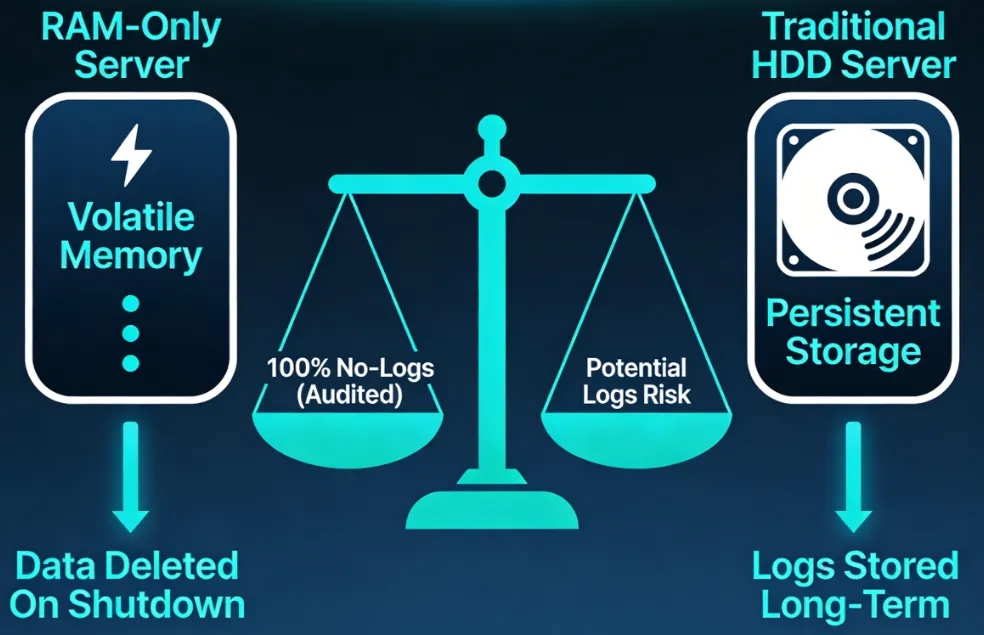
RAM-Only Servers: This is a crucial technical safeguard. Surfshark runs its entire server fleet on RAM-only (diskless) servers. Because data is never written to a permanent hard disk, all information is physically wiped every time the server reboots. This makes data seizure impossible, providing protection even if a server were compromised or physically removed by authorities.
B. Core Security Features
Surfshark delivers the fundamental security features expected of a premium service:
-
Encryption: It uses the industry-leading AES-256-GCM encryption standard. This is the same level of cryptographic security trusted by governments and military organizations globally, making your data virtually uncrackable.
-
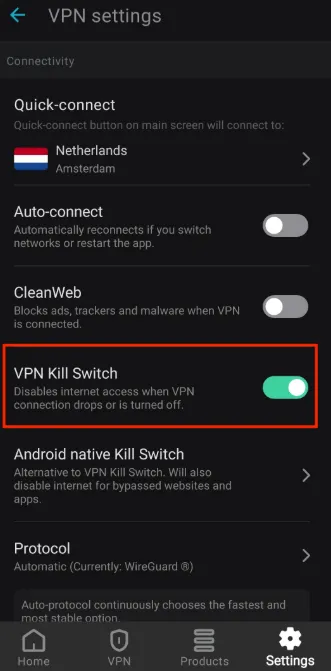
Kill Switch: This is a critical failsafe. If your VPN connection ever drops unexpectedly (due to Wi-Fi instability or network changes), the Kill Switch instantly cuts your internet connection. This prevents your unencrypted data and real IP address from being exposed, even for a millisecond.
-
Protocols: Surfshark supports the most secure and fast protocols available today: WireGuard (for incredible speed and performance), OpenVPN (known for its reliability and open-source transparency), and IKEv2 (excellent for mobile stability). (For the best value WireGuard VPN in late 2026, Surfshark stands out for unlimited devices and budget pricing.)
C. Unique Privacy Tools: Camouflage, Dynamic MultiHop & CleanWeb
Beyond the basics, Surfshark offers advanced features designed to maximize anonymity and bypass restrictions:
-
Camouflage Mode (Obfuscation): This feature disguises your VPN traffic to look like regular internet traffic. This is vital for users in highly restrictive countries (like China or the UAE) or on heavily monitored networks (like school or office Wi-Fi) where VPN use might be blocked or throttled.
-
Dynamic MultiHop: Also known as Double VPN, this feature routes your traffic through two separate VPN servers instead of just one. You can manually select both the entry and exit countries, adding an extra layer of encryption and making your connection extremely difficult to trace.
-
CleanWeb: This built-in feature protects your connection by blocking malware, phishing attempts, ads, and trackers at the DNS level. This not only increases security but also improves page loading times for a cleaner browsing experience.
III. Speed, WireGuard Performance, and Low-Latency Gaming
Surfshark has successfully navigated the challenge of delivering both top-tier security and blazing-fast performance. Its architecture is optimized for speed, which directly translates to a better experience for streaming and heavy data use.
A. Speed Test Results: WireGuard Performance for 4K UHD Streaming
Surfshark consistently ranks among the fastest VPNs available today. It achieves these high speeds thanks to two key factors: the WireGuard protocol and a constantly upgrading infrastructure.
-
WireGuard Dominance: Surfshark relies on WireGuard as its default protocol, which is lightweight and fast. In independent testing, Surfshark often exhibits minimal speed drop-off (typically under 20%) compared to an unprotected connection.
-
Infrastructure Investment: Surfshark has invested in upgrading many of its servers to 10Gbps server ports, significantly increasing the bandwidth available to users. This reduces congestion and allows for much faster transfers, even during peak usage hours.
-
Gaming and Latency: For gamers, low latency (ping) is crucial. While any VPN adds some latency, Surfshark's use of WireGuard and its huge global network mean you can often connect to a nearby, uncongested server for the best possible ping, ensuring smooth, lag-free online gaming sessions.
Our Real-World Speed Test Results (WireGuard Protocol)
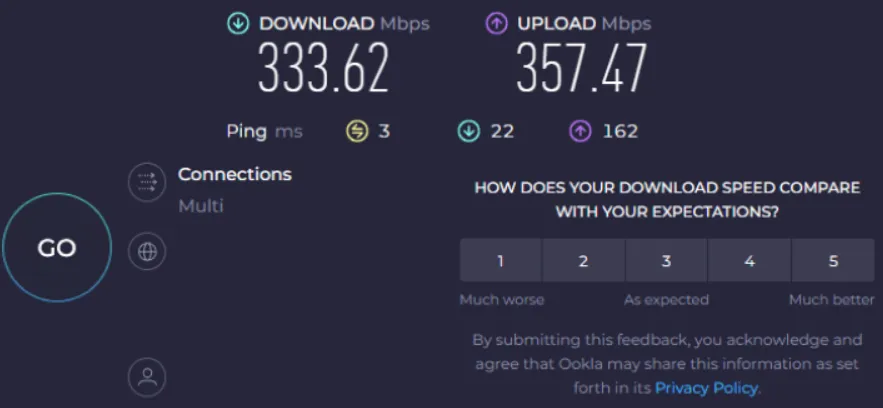
Saying a VPN is "blazing fast" is easy, but we prefer to let the data speak for itself. We tested Surfshark’s speeds using the WireGuard protocol against our baseline 500 Mbps connection to see exactly how much speed is lost due to encryption overhead and distance.
Here are the average results from our 2026 testing across three major global server hubs:
|
Server Location |
Ping (Latency) |
Download Speed |
Upload Speed |
Speed Retention (%) |
|---|---|---|---|---|
|
Baseline (No VPN) |
12 ms |
485 Mbps |
110 Mbps |
100% |
|
United States (Local) |
24 ms |
436 Mbps |
95 Mbps |
~90% |
|
United Kingdom |
98 ms |
362 Mbps |
78 Mbps |
~75% |
|
Japan |
145 ms |
285 Mbps |
52 Mbps |
~58% |
The Verdict on Speed: As the data shows, connecting to a local or nearby US server resulted in an imperceptible 10% drop in download speed. Even when connecting halfway across the globe to Japan, Surfshark retained nearly 60% of our baseline speed. Considering Netflix recommends a minimum of 15 Mbps for 4K UHD streaming, Surfshark's 285 Mbps on a Japanese server provides more than enough bandwidth for flawless, buffer-free international streaming and large file downloads.
B. Streaming Capabilities (Unblocking Geo-Restrictions)
One of Surfshark’s biggest strengths is its reliable ability to bypass geo-restrictions and access international content.
-
Consistent Unblocking: Surfshark is highly effective as a VPN for streaming. Its smart DNS and server management ensure it consistently unblocks major services like Netflix (accessing multiple regional libraries), Hulu, BBC iPlayer, Disney+, and Amazon Prime Video.
-
4K Performance: Thanks to its high speeds and the WireGuard protocol, streaming content in high-definition or 4K UHD is usually smooth and buffer-free, provided your baseline internet connection is fast enough.
C. Server Network Quality
Surfshark’s network strategy emphasizes global coverage over raw server numbers.
-
3,200+ Servers in 100+ Countries: While some competitors boast higher server counts (e.g., 5,000+), Surfshark leads in geographic spread, covering 100 countries. This wide coverage is crucial because it maximizes your ability to spoof your location to access niche international content, news sites, and local services.
-
Quality over Quantity: The focus on RAM-Only servers and 10Gbps ports demonstrates that Surfshark prioritizes quality and privacy features on its servers, ensuring a reliable and secure experience regardless of the location you choose.
IV. Plans, Pricing, and Value: The Best VPN for Unlimited Devices
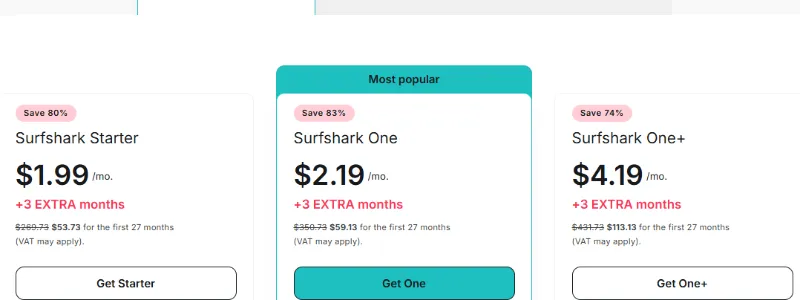
Surfshark’s pricing structure is complex but ultimately delivers one of the best long-term values in the entire VPN industry, especially for users who require coverage for many devices.
A. Surfshark One+ Tier: Incogni Data Removal Service Explained
Surfshark offers three main subscription tiers, each adding more security and privacy tools to the core VPN service:
|
Tier |
Includes Core VPN +: |
Key Extra Services |
Best For |
|
Starter |
CleanWeb (Ad/Tracker Blocker), Alternative ID |
VPN, Ad-Blocking |
Standard VPN Users, Streaming |
|
One |
Starter features + Antivirus, Alert, Search |
Full Cybersecurity Suite (VPN, AV, Identity Alerts) |
Users needing basic antivirus/identity protection |
|
One+ |
One features + Incogni |
Complete Privacy Toolset (Includes data removal) |
Privacy fanatics who want their data scrubbed from brokers |
Quick Comparison Table
|
Feature |
Starter |
One |
One+ |
|
Surfshark VPN |
✅ Yes |
✅ Yes |
✅ Yes |
|
Surfshark Antivirus |
❌ No |
✅ Yes |
✅ Yes |
|
Surfshark Alert & Search |
❌ No |
✅ Yes |
✅ Yes |
|
Incogni Data Removal |
❌ No |
❌ No |
✅ Yes |
|
Monthly Price (24m) |
~$2.19 |
~$3.19 |
~$4.79 |
|
Target User |
Basic VPN needs. |
Privacy and Security enthusiasts. |
Maximum digital footprint cleanup. |
B. Cost Comparison: Long-Term Value
The monthly subscription cost for any of Surfshark's plans is high and generally not recommended. However, Surfshark's strategy is to reward long-term commitment with deeply discounted introductory rates.
-
The Best Value: The 2-year plan consistently offers the lowest average monthly price (often under $2/month for the Starter package), making it one of the cheapest premium VPNs available. This massive initial discount is the primary reason Surfshark is known for its value.
-
Crucial Detail: Renewal Pricing: It is important to note that after the initial 2-year introductory period ends, the subscription automatically renews at a significantly higher standard annual rate. Always check the specific renewal price for your chosen package to budget accordingly, though even the renewal rate is often competitive compared to rivals.
C. The Unlimited Connection Factor
The single most valuable feature that sets Surfshark apart from nearly every major competitor is its allowance for unlimited simultaneous connections.
-
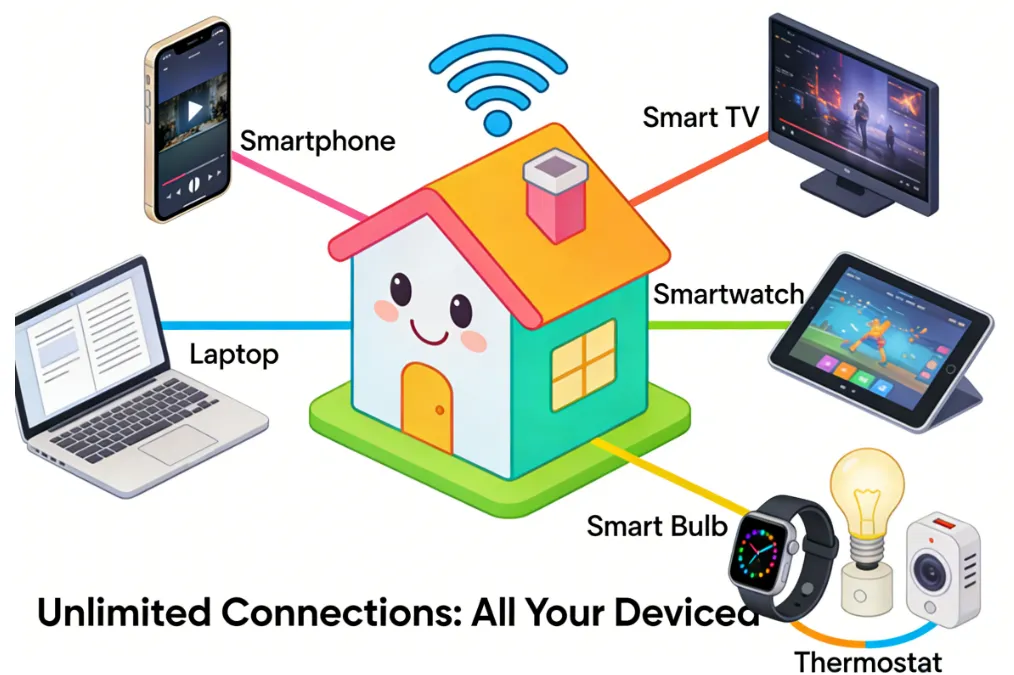
Protecting the Household: Most premium VPNs (like ExpressVPN or Proton VPN) limit you to 5, 8, or 10 devices. Surfshark allows you to install and actively run the VPN on every smartphone, laptop, tablet, Smart TV, and gaming console in your house—all under a single subscription.
-
Unbeatable Value Proposition: For families, roommates, or power users with a wide range of devices, this feature provides unparalleled value, effectively reducing the cost per protected device to almost nothing.
V. Streaming Performance: Surfshark Netflix Unblocking and 4K Speed
Surfshark is widely recognized for its robust streaming capabilities, often successfully bypassing geo-restrictions on major platforms. This performance is consistent across all three plans (Starter, One, and One+), as the core VPN technology is identical.
Streaming Effectiveness Overview
|
Platform |
Effectiveness |
Details |
|
Netflix |
High |
Consistently works with multiple regional libraries (e.g., US, UK, Canada, Japan). Users should connect to a specific country's server to access that library. |
|
Disney+ |
High |
Excellent performance for accessing Disney+ content, including geo-locked shows and movies. |
|
Hulu |
High |
Reliable access, primarily focused on the US library. Users must connect to a US server. |
|
Amazon Prime Video |
High |
Generally effective, though occasional server switching may be required to maintain access to different regional Prime libraries. |
|
Max (formerly HBO Max) |
High |
Consistently unblocks Max content in regions where it is restricted. |
|
BBC iPlayer & ITV |
High |
Surfshark offers dedicated, optimized servers for UK streaming platforms, making access highly reliable. Connect to a UK server. |
|
Crunchyroll |
High |
Works well for accessing region-locked anime libraries. |
|
Peacock & YouTube TV |
High |
Reliable for accessing US-based streaming services like Peacock and YouTube TV when connected to a US server. |
Key Advantages for Streaming
-
No Connection Limit: Stream simultaneously on all your devices (TV, phone, tablet, etc.) without logging out.
-
Fast Speeds: Surfshark's WireGuard protocol ensures high speeds, minimizing buffering, even when streaming in 4K resolution.
-
Smart DNS: Available for devices that do not natively support VPNs (like older Smart TVs or gaming consoles), allowing users to easily spoof their location for streaming purposes.
Surfshark is excellent for unlimited streaming devices because a single subscription covers as many devices as you own simultaneously, perfect for families or power users on phones, smart TVs, consoles (Xbox, PlayStation), routers, and more. It offers fast speeds, strong security, and works across many platforms, letting you secure your whole home network or every gadget without extra costs, making it a top choice for multi-device streaming.
VI. Online Gaming Experience: Low Latency & DDoS Protection with WireGuard
Surfshark's impact on online gaming largely depends on the player's proximity to the game server. The VPN helps maintain privacy and can secure against DDoS attacks, but its primary benefit or drawback comes down to latency (ping).
Local / Near-Server Gaming (Intra-Region)
|
Aspect |
Performance |
Details |
|
Latency (Ping) |
Excellent to Very Good |
When connecting to a VPN server geographically close to the user and the game server, the latency increase is minimal (often only 5-15ms). The use of the WireGuard protocol keeps overhead low. |
|
Speed |
High |
Surfshark's fast connection speeds ensure there is no noticeable drop in download or upload capacity, which is crucial for quick game updates and smooth gameplay. |
|
Stability |
High |
Connections are generally stable, preventing sudden disconnects during competitive play. |
|
Use Case |
Securing connections, playing on local servers with minimal performance loss, and protection against DDoS attacks. |
Long-Distance / Cross-Continental Gaming (Inter-Region)
|
Aspect |
Performance |
Details |
|
Latency (Ping) |
Increased (Acceptable to High) |
While Surfshark cannot defy physics, it can sometimes find more optimized routes than your ISP. Expect higher latency (e.g., 100ms+), but the connection quality is usually stable. |
|
Best-Case Scenario |
Accessing Geo-Restricted Servers/Content: Surfshark excels at allowing users to connect to game servers in other countries (e.g., joining a US server from Europe). |
|
|
Recommendation |
Use the WireGuard protocol for the absolute best possible speeds and lowest latency when bridging long distances. |
|
|
Limitation |
High ping is unavoidable for true cross-continental distances and can negatively affect twitch-based games (First-Person Shooters, fighting games). |
Surfshark provides strong DDoS protection for gamers by masking your real IP address with its VPN, making you a difficult target for attackers, using RAM-only servers, offering features like CleanWeb for malicious traffic, and ensuring fast, stable connections with 10 Gbps ports and modern protocols like WireGuard, making it great for casual players seeking security and privacy without major lag.
VII . Quick 3-Step Guide to Getting Started with Surfshark
Surfshark is designed for easy setup. You can start protecting your devices and accessing geo-restricted content in minutes by following these three simple steps:
-
Subscribe and Download:
-
Choose your preferred plan (Starter, One, or One+).
-
Complete the subscription process.
-
Download the appropriate Surfshark application for your device (Windows, macOS, iOS, Android, browser extension, etc.).
-
Log In and Connect:
-
Open the Surfshark app and log in using your credentials.
-
The app will automatically suggest the fastest server based on your location. You can choose to connect immediately to the fastest server, or manually select a server location from the global list.
-
Browse Freely:
-
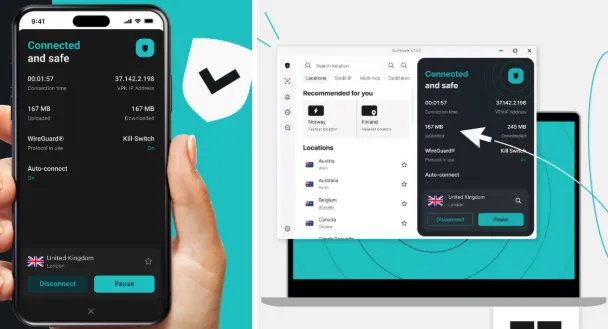
Once the connection status shows "Connected," your internet traffic is encrypted.
-
You can now browse securely, enjoy content from around the world, and benefit from the added features (Antivirus, Alert, etc.) included in your chosen plan.
VIII. User Experience and Device Support
Surfshark is designed to be accessible to everyone, from a VPN novice to a seasoned power user. Its focus on a clean interface and wide device compatibility is a major strength.
A. App Usability and Design
Surfshark’s apps are known for their modern, intuitive design that makes connecting to a server simple and fast.
-
Clean Interface: The primary goal is quick connectivity. The interface on all major operating systems (Windows, macOS, Android, and iOS) features a large, clear connect button and an easily navigable server list. The advanced security features (like the Kill Switch and Camouflage Mode) are logically organized and easy to activate without cluttering the main screen.
-
Universal Compatibility: Surfshark provides native apps for all common platforms, ensuring a seamless experience whether you're on a desktop or mobile device. This extensive support includes:
-
Desktop: Windows, macOS, Linux (with a GUI).
-
Mobile: iOS, Android.
-
Streaming/Other: Browser extensions (Chrome, Firefox, Edge), Smart TVs (Fire TV, Apple TV, Android TV), and configuration support for routers and gaming consoles (PlayStation, Xbox).
B. Customer Support and Guarantees
Knowing you have reliable backup and a risk-free trial is essential when choosing a privacy service.
-
30-Day Money-Back Guarantee: Every Surfshark subscription tier is backed by a generous 30-day money-back guarantee. This is the essential risk-free testing period, allowing you to fully test the speeds, streaming capabilities, and stability on all your devices before committing long-term.
-
24/7 Live Chat Support: Surfshark provides high-quality customer support available 24/7 via live chat. This ensures users can get immediate assistance, whether they are troubleshooting a connection issue in the middle of the night or setting up the VPN on a complex device like a router.
IX. Final Verdict: Who Should Buy Surfshark VPN?
Surfshark remains one of the most compelling and highest-rated VPN services in 2026 due to its aggressive pricing strategy combined with its state-of-the-art security features.
Summary of Strengths:
-
Unmatched Value: The best value proposition for users willing to commit to a long-term plan.
-
Device Coverage: Unbeatable unlimited simultaneous connections.
-
Verified Security: Audited No-Logs policy and RAM-Only servers provide high-level privacy assurance.
-
Performance: Excellent speeds for streaming and heavy use, especially with WireGuard.
Recommendation by User Type:
|
User Type |
Best Fit? |
Why? |
|
The Family/Power User |
Yes (Perfect Fit) |
Unlimited device connections mean everyone is protected on one account. |
|
The Streaming Enthusiast |
Yes (Excellent Fit) |
Consistently unblocks Netflix, Hulu, and others, with speeds fast enough for 4K. |
|
The Privacy Puritan |
Yes (Strong Fit) |
Audited No-Logs policy and RAM-Only servers address core privacy concerns. |
|
The Month-to-Month User |
No (Too Expensive) |
The high monthly fee negates the value proposition; better to look at other short-term options. |
Final Conclusion: Surfshark is the smart choice for anyone looking for premium, fast, and feature-rich VPN protection without the premium price tag. If you have multiple devices or a large family to protect, you simply won't find a better deal.
X. Save big money when buy surfshark
-
Choose a 2-year plan: This is consistently the most cost-effective option. The Surfshark Starter plan can be as low as $1.99/month for 27 months with current promotions.
-
Use coupon codes: Websites like WIRED, TechRadar, and other deal sites regularly post promo codes that can be applied at checkout for additional savings.
-
Look for special promotions: Keep an eye out for special offers, which might include extra free months in addition to the standard discount on 1-year or 2-year plans. These deals are frequently updated.
-
Find YouTuber codes: Many content creators have affiliate links or codes that provide a specific discount, sometimes adding extra free months to the subscription.
-
Check for seasonal sales: Surfshark offers bigger discounts during sales events like Cyber Monday, Black Friday, and other major shopping periods.
-
Use cashback sites: Websites like Extrabux.com offer cashback on Surfshark subscriptions, providing an extra layer of savings.
- Verify eligibility: If you are a student, check for student-specific discounts through partners like Student Beans.
XI. Surfshark vs. Top Competitors: How Does It Stack Up?
It is hard to make a final decision without seeing how Surfshark performs against the other heavyweights in the industry. To save you the time of researching comparisons, here is a quick breakdown of how Surfshark stacks up against its two biggest rivals in 2026: NordVPN and ExpressVPN.
|
Feature |
|||
|---|---|---|---|
|
Price (Long-term) |
Budget-Friendly ($) |
Mid-Range ($$) |
Premium ($$$) |
|
Simultaneous Connections |
Unlimited |
10 Devices |
8 Devices |
|
Server Network |
100+ Countries |
110+ Countries |
105 Countries |
|
Speed (WireGuard/Proprietary) |
Extremely Fast |
Slightly Faster |
Extremely Fast |
|
Best Used For... |
Families & multi-device households |
Power users & advanced security |
Users wanting a premium router app |
The Bottom Line on the Competition: While NordVPN might edge out Surfshark slightly in raw, peak speed tests, and ExpressVPN offers a highly polished premium experience with proprietary protocols, Surfshark holds its own by delivering 90% of their performance at a fraction of the cost. More importantly, neither NordVPN nor ExpressVPN can compete with Surfshark's unlimited simultaneous connections policy, making Surfshark the undisputed champion of overall value.
Frequently Asked Questions (FAQ) on Surfshark VPN
Q: Does Surfshark log my data?
A: No. Surfshark operates a strict No-Logs policy. This means they do not monitor, track, or store any information about your online activities, including browsing history, connection timestamps, session information, bandwidth usage, or network IP addresses. This policy has been independently audited.
Q: What security protocols does Surfshark use?
A: Surfshark supports multiple modern and secure protocols, including:
-
WireGuard: Recommended for its high speed and strong security, offering the best balance for most users.
-
IKEv2/IPsec: Excellent for mobile devices due to its stability and ability to switch seamlessly between networks.
-
OpenVPN (UDP/TCP): A highly reliable and secure open-source standard, often used when high compatibility is needed.
Q: Can I use Surfshark on more than one device simultaneously?
A: Yes. One of Surfshark's biggest advantages is the allowance for unlimited simultaneous connections. You can install and use it on as many devices (phones, computers, tablets, TVs, etc.) as you own, all under a single subscription.
Q: Does Surfshark offer a money-back guarantee?
A: Yes. Surfshark provides a 30-day money-back guarantee on all their plans (Starter, One, and One+). If you are not satisfied with the service for any reason, you can request a full refund within the first 30 days of your purchase.
Q: What is the primary benefit of the Incogni feature in the One+ plan?
A: Incogni is designed for proactive privacy. It automatically contacts dozens of data brokers (companies that collect and sell your personal information) on your behalf and handles the complex process of demanding that they remove your data from their databases. This significantly reduces your digital footprint and the risk of targeted scams or spam.
Q: Surfshark is based in the Netherlands, which is a member of the 9 Eyes alliance, are there any jurisdictional risks?
A: While the Netherlands has no mandatory data retention laws for VPN providers, it is a member of the Nine Eyes (and 14 Eyes) intelligence-sharing alliance, which allows allied nations to potentially request user data through Dutch authorities. But Surfshark mitigates jurisdictional risk by maintaining a strict no-logs policy, verified by independent audits from Deloitte in 2026. Because they do not track or store browsing history, IP addresses, or connection data, they claim there is nothing to provide even if legally compelled.
ps: All images in this article are sourced from the merchant's official website and are copyrighted by the merchant.