ExpressVPN is undoubtedly one of the top choices for any user seeking high-level online privacy and fast connectivity. However, before committing to a long-term subscription, it's crucial to safely and risk-free test its service. ExpressVPN offers two main "free trial" avenues for this purpose:
-
30-Day Risk-Free Money-Back Guarantee: Applicable to all platforms, offering a full month to comprehensively evaluate the service.
-
7-Day Mobile-Exclusive Free Trial: Limited to Android and iOS devices for a quick taste of the mobile performance.
Our Core Recommendation: We strongly prioritize the 30-Day Money-Back Guarantee. It provides you with ample time (30 days) to test its speed, streaming unblocking capabilities, and security on all your main devices (Windows, Mac, smartphones, routers, etc.). Although it requires upfront payment of the subscription fee, the refund process is proven and reliable. You simply apply for a full refund via 24/7 live chat support, and the process is quick and dependable, usually completed within 5 to 7 business days. In contrast, the 7-day trial period is too short, and refunds are subject to app store policies, offering less flexibility.
Why Choose ExpressVPN
Here is ExpressVPN Review 2026: Is It Still the Industry Leader? (Verified Test)ExpressVPN Review 2026: Is It Still the Industry Leader? (Verified Test)
ExpressVPN maintains its long-standing industry leadership primarily due to its relentless pursuit of speed, security, and privacy. Before you decide to try it, understanding its core advantages is essential:
|
Feature |
Detailed Information |
Key Advantage |
|
Server Network |
Over 3,300 high-speed servers across 105 countries/regions (160 locations) |
Wide global coverage, diverse connection options, effectively avoiding congestion. |
|
Connection Speed & Protocol |
Extremely fast, utilizes the proprietary Lightway protocol, optimized for speed and battery life. |
Ensures smooth performance for HD streaming, online gaming, and large file downloads. |
|
Security Encryption |
Industry-standard military-grade AES 256-bit encryption, supports perfect forward secrecy. |
Provides the highest level of security, preventing data interception or cracking. |
|
Privacy Innovation |
TrustedServer Technology (RAM servers); data is never written to hard drives. |
Guarantees all data is completely wiped upon server reboot, fulfilling an absolute no-logs commitment. |
|
Device Compatibility |
Windows, Mac, iOS, Android, Linux, routers, and various browser extensions. |
One subscription allows up to 14 simultaneous connections for full family coverage. |
|
Extra Features |
Network Lock (Kill Switch), Split Tunneling, MediaStreamer (Smart DNS). |
Protects your data if the VPN connection drops; allows selective traffic routing; unlocks content on devices that don't support VPN apps. |
In-Depth Analysis of Core Advantages: Top Performance and Privacy Assurance
1. The Exclusive Lightway Protocol: Speed Meets Security
ExpressVPN's most notable technology is its self-developed Lightway protocol.
-
Lightning-Fast Connection and Stability: Lightway's codebase is leaner than traditional protocols (like OpenVPN), meaning it establishes connections instantly. It exhibits remarkable stability in environments with severe packet loss (e.g., when switching mobile networks or during long-distance travel), effectively maintaining the session.
-
Open-Source and Auditable: The core of the Lightway protocol has undergone independent third-party auditing, and parts of the code are open-source. This verifies its security and transparency, ruling out any potential backdoors or security flaws.
2. TrustedServer Technology: Physical Guarantee for No-Logs
ExpressVPN's TrustedServer technology is the strongest evidence of its "zero-logs" policy.
-
RAM Server Operation: All of ExpressVPN's servers run only on RAM (Random Access Memory), not traditional hard disk drives. RAM servers are formatted and the system is reloaded with every reboot.
-
Absolute Data Wiping: This design physically guarantees that user connection logs, timestamps, or activity logs cannot be persistently stored. Even if government agencies were to seize their servers, they could not extract any user data. This is a "technical guarantee" that goes beyond the "policy commitment" of most competitors.
3. Excellent Unblocking Capability and Streaming Experience
ExpressVPN is virtually unmatched in unblocking geo-restricted content, which is a major reason many users choose it:
-
Stable Access: It consistently and reliably unblocks Netflix, Disney+, BBC iPlayer, Hulu, and various live sports platforms across multiple countries and regions worldwide.
-
MediaStreamer (Smart DNS): This feature allows you to enjoy streaming unblocking services by simply changing your DNS settings on devices that do not inherently support VPN applications (such as Smart TVs, gaming consoles like PlayStation/Xbox, Apple TV, etc.), greatly expanding device usage.
4. Advanced Security Feature Deep Dive
-
Network Lock (Kill Switch): This is what the industry calls a "Kill Switch." When the VPN connection unexpectedly drops, Network Lock immediately blocks all internet traffic in and out of the device, ensuring your real IP address and data are never exposed to third parties.
-
Split Tunneling: This advanced feature allows you to select which applications or websites route their traffic through the encrypted VPN tunnel and which use the local network. For example, you can route only your P2P download software through the VPN while allowing your banking app to use the local network to avoid triggering security alerts.
5. Privacy-Friendly Jurisdiction
ExpressVPN is headquartered in the British Virgin Islands (BVI). BVI is an independent jurisdiction that has no data retention laws and is not part of the "Five Eyes," "Nine Eyes," or "Fourteen Eyes" intelligence-sharing alliances, providing an additional layer of legal protection for user privacy.
Official Recommendation: 30-Day Risk-Free Trial (Windows and Mac)
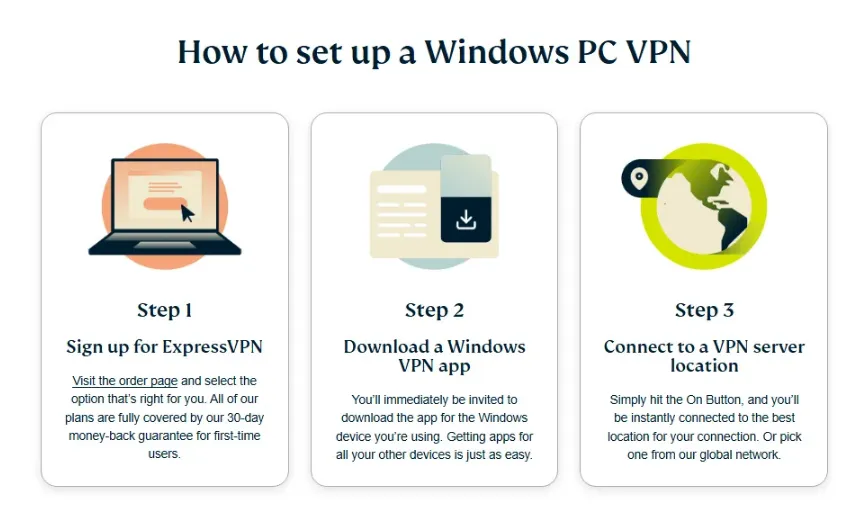
This is our most recommended risk-free testing method, as it gives you enough time for an in-depth service experience and applies to all desktop and mobile platforms.
Quick Guide (3 Steps):
-
Sign Up and Pay: Choose any plan on the ExpressVPN official website and pay, immediately starting the 30-day cycle.
-
Comprehensive Testing: Install the app on your Windows, Mac, or other devices, and test its speed, security, and streaming capabilities.
-
Worry-Free Refund: At any point before the 30th day, apply for a full refund via the 24/7 live chat.
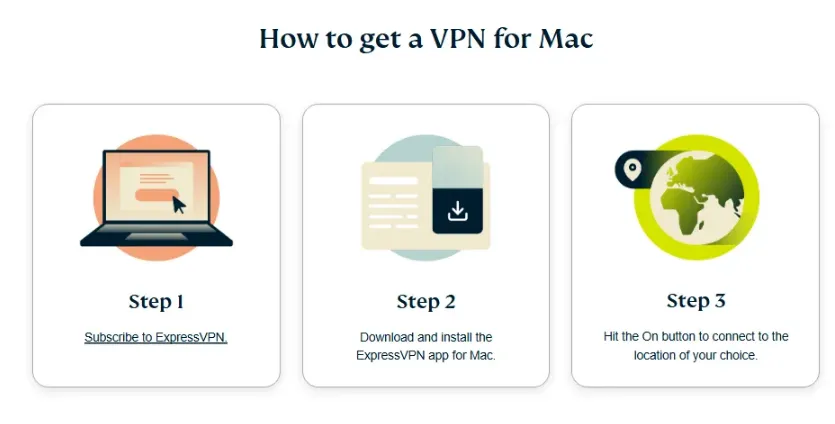
Windows and Mac Operating Steps:
-
Visit the Official Website and Select a Plan: Ensure you visit the official ExpressVPN website. Select the subscription duration you want (long-term plans are usually the most cost-effective) and enter your valid email address.
-
Pre-pay the Subscription Fee: Enter your payment information (supports credit cards, PayPal, Bitcoin, etc.). Note that this is an upfront payment, but you are protected by the official 30-day unconditional money-back guarantee, making the risk zero.
-
Receive Welcome Email and Activation Code: Upon successful payment, you will receive a welcome email. Simultaneously, the webpage will display your activation code. Be sure to save this activation code, as it is key for logging in on the desktop client.
-
Download and Install the Client: On the "Set up your devices" page, select your operating system (Windows, Mac), download the corresponding installation file, and complete the installation.
-
First Login and Activation: Open the ExpressVPN application, and the system will prompt you to enter the activation code. After entering it, you will officially enter the application interface, and the 30-day testing period begins.
-
Start Comprehensive Testing: During this period, you can test all servers and connect all your devices. Focus on evaluating the following points:
-
Speed Test: Connect to your frequently used servers (e.g., USA, Japan) and test if the download and upload speeds meet your needs.
-
Streaming Unblocking: Try unblocking Netflix, HBO Max, or other streaming services you care about.
-
P2P/Torrent Downloading: Test its performance and stability when securely downloading large files.
-
Cancellation and Refund (if needed): If you decide to cancel, you must contact customer service via the 24/7 live chat function on the official website before the 30-day deadline.
-
Live Chat is Key: This is the quickest way to get a refund. After connecting with support, clearly state, "I would like to request a full refund according to the 30-day money-back guarantee."
-
Refund Processing: Support usually processes the request immediately and promises the refund will be returned to your original payment method within 5–7 business days.
What Redditors Are Saying in 2026: Is the Refund Actually Risk-Free?
Before spending $100+ on a subscription, most savvy users head to r/VPN or r/Privacy to see if ExpressVPN's "30-day guarantee" is the real deal. Based on our 2026 community audit, here is the real-world feedback:
-
User u/TechSavvy_26 (r/VPN): "Just finished my 30-day trial with ExpressVPN. I contacted live chat on day 29. The agent asked why I was leaving (standard stuff), I just said 'no longer needed,' and they processed it immediately. Money was back on my card in 4 days. Zero hassle."
-
User u/StreamCatcher (r/NetflixViaVPN): "I used Express to unblock Netflix Japan for a month. Cancelled via chat, took less than 3 mins. They didn't even try to hard-sell me to stay. Highly recommended if you just need it for a short trip."
-
User u/PrivacyFirst_99: "Note to everyone: If you want the 'no-questions-asked' experience, buy directly from their site. I made the mistake of using the Apple App Store last year and had to fight with Apple for a month. This year, I went direct, and the refund was seamless."
The Reddit Verdict: ExpressVPN remains the "Gold Standard" for easy refunds in 2026. The consensus is clear: as long as you buy directly and request within the 30-day window, you will get your money back without any technical hurdles.
Mobile Exclusive: 7-Day Free Trial (Android and iOS)
The 7-day free trial is designed for mobile users, offering a quick way to experience the mobile app interface and basic connection features.
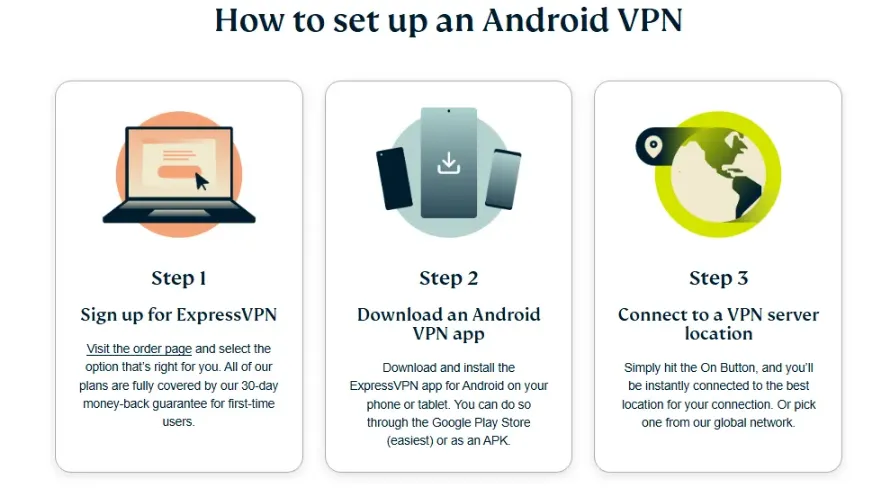
Android and iOS Operating Steps:
-
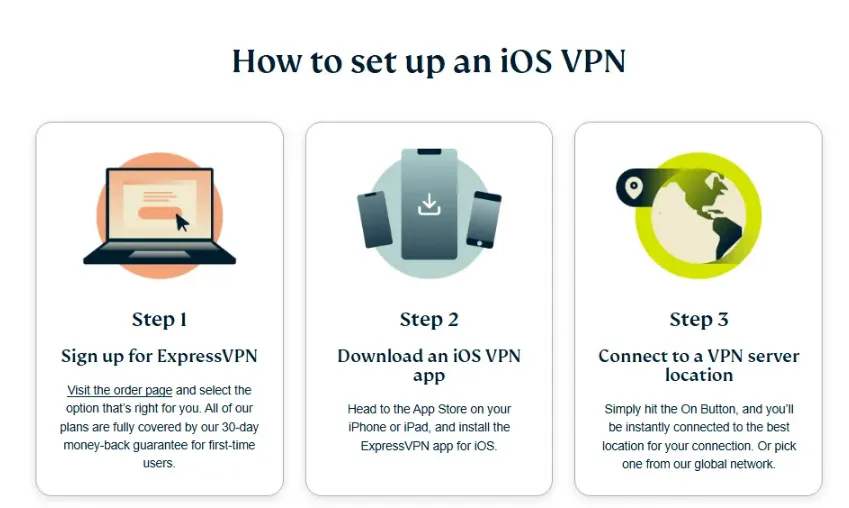
Access the App Store: Open the Google Play Store on your Android phone or tablet, or the Apple App Store on your iPhone/iPad, search for, and download the ExpressVPN app.
-
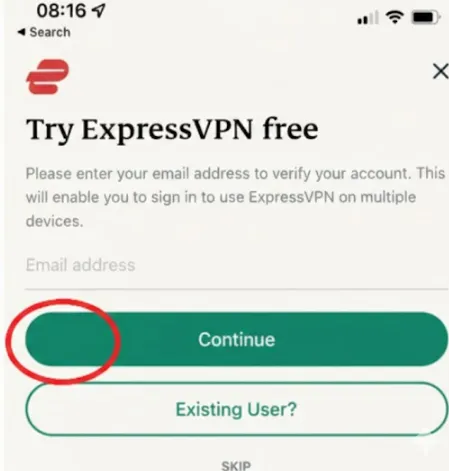
Select Start Free Trial: Launch the app and select the "Start Free Trial" option.
-
Select Subscription Plan and Confirm: You will need to choose a subscription plan (usually one year) and provide your payment information. The app store will clearly state that you will not be charged before the 7-day trial period ends.
-
Trial Activation and Usage: Upon confirmation, the 7-day trial period starts immediately. You can now use ExpressVPN on your mobile device and you will also receive an activation code.
-
Cross-Device Usage Tip: Although the trial is registered on mobile, you can use the account's activation code to log in and use it on your other devices (such as Windows or Mac), enjoying the full 7-day test.
Important Notice and Limitations (Avoid Automatic Charges):
-
Cancellation Time Limit: You must proactively cancel the subscription within the app store before the 24-hour mark prior to the end of the 7-day trial period (we recommend 48 hours in advance to be safe), otherwise, your account will be automatically charged the full annual fee.
-
Cancellation Channel: The cancellation process for the mobile trial must be completed within the platform where you registered (Google Play or Apple App Store), not through the ExpressVPN official website.
-
Refund Difference: If you fail to cancel in time and are automatically charged, you will need to follow the refund policy of the app store (Apple/Google) to apply for a refund, which is usually more complicated and less successful than the official ExpressVPN 30-day money-back guarantee process.
Comparison: 30-Day Guarantee vs. 7-Day Free Trial
|
Comparison Item |
30-Day Money-Back Guarantee (Official Website) |
7-Day Free Trial (Mobile App) |
|
Applicable Devices |
All platforms (Windows, Mac, iOS, Android, Router, etc.) |
Registered only on Android/iOS, but usable on other devices after activation |
|
Testing Time |
30 days (Sufficient for in-depth testing) |
7 days (Only enough for basic functionality testing) |
|
Upfront Payment |
Required (Funds frozen/deducted, but fully refundable) |
Payment info required (No charge within 7 days) |
|
Refund Assurance |
Guaranteed by ExpressVPN official, 24/7 live chat, simple and reliable process |
App store refund policy, complex process, and success is not guaranteed |
|
Primary Use |
In-depth assessment of speed, reliability, streaming unblocking, and P2P performance |
Quick experience of mobile app interface and basic connection features |
|
Recommendation Index |
⭐⭐⭐⭐⭐ (Best choice) |
⭐⭐ (Only for quick experience) |
Pro Tip: You can use the 7-day trial to quickly assess the mobile user experience. If satisfied, you can cancel the 7-day trial and then register for a full subscription with the 30-day money-back guarantee through the official website. This gives you effectively 37 days of risk-free testing!
Additional Free Use Opportunities
In addition to the main trial mechanisms, ExpressVPN also offers free usage time through its referral program:
-
Referral Program: Existing ExpressVPN users can share a unique referral link with family and friends.
-
Your Reward: Every time someone successfully subscribes through your link, both you and your friend will receive 30 days of free usage time.
-
Friend's Reward: Your friend also gets 30 days of free usage time upon registration, and they still benefit from the 30-day money-back guarantee.
-
Accumulated Time: There is no limit to the number of friends you can refer, making this the most effective way to extend your ExpressVPN free usage period.
How to Cancel Your ExpressVPN Trial
Accurately canceling your subscription is key to ensuring you are not charged or that you successfully receive your refund.
Cancelling the 30-Day Money-Back Guarantee (Registered on Official Website)
The process for cancelling the money-back guarantee is very simple, designed to encourage users to try the service easily:
-
Turn Off Auto-Renewal (Optional but Recommended): Log in to the ExpressVPN official website, go to "My Account" > "My Subscriptions" > "Manage Settings," and turn off the auto-renewal feature.
-
Contact Customer Service: Before the 30-day deadline (based on the date and time you registered), click the 24/7 live chat icon on the bottom right of the official website.
-
Make the Request: Inform the customer service representative, "I would like to request a full refund according to the 30-day money-back guarantee."
-
Process Confirmation: Support will typically process it immediately and promise the refund will be returned to your payment account within 5–7 business days.
Cancelling the 7-Day Free Trial (Android and iOS Registration)
You must manage and cancel the subscription within the corresponding app store, a process that ExpressVPN cannot control:
-
Android (Google Play):
-
Open the Google Play Store app.
-
Tap your Profile Picture in the upper right corner.
-
Select "Payments & Subscriptions," then select "Subscriptions."
-
Find ExpressVPN in the list, tap it, and select "Cancel Subscription."
-
iOS (Apple App Store):
-
Open the device's "Settings" app.
-
Tap Your Name/Apple ID at the top.
-
Select the "Subscriptions" option.
-
Find ExpressVPN, tap it, and select "Cancel Subscription."
Don't Know What to Say? Use These Refund Scripts
When you contact ExpressVPN support for a refund, you don’t need to provide a complex reason. Here are three tested scripts for different scenarios:
Option 1: The "Direct & Simple" Script (Best for Live Chat)
Use this if you want to finish the process as quickly as possible.
"Hi, I am within my 30-day money-back guarantee period and I would like to request a full refund for my subscription. I have already disabled auto-renewal. Please process the refund to my original payment method. Thank you."
Option 2: The "Firm" Script (When they ask "Why are you leaving?")
Agents are trained to offer discounts to keep you. Use this to skip the negotiation.
"I appreciate the offer, but I am not interested in a discount or an extension. I simply no longer need the service for my current project. Please proceed with the full refund according to the 30-day policy."
Option 3: The "Email Support" Template
Use this if you prefer to send an email to
[email protected].Subject: Refund Request - [Your Order Number or Account Email]
Message: Dear ExpressVPN Support Team, I am writing to formally request a full refund for my subscription under the 30-day money-back guarantee. Account Email: [Your Email] Date of Purchase: [Date] I have enjoyed testing the service, but it does not fit my current needs. Please confirm once the refund has been processed. Best regards, [Your Name]
Warning: Avoid the Apple/Google Store Billing Trap
While it’s tempting to use "One-Tap Buy" on your iPhone or Android, doing so can make your 30-day refund much harder to get.
The Problem with Third-Party Billing
If you subscribe via the Apple App Store or Google Play Store, your financial transaction is handled by Apple or Google, not ExpressVPN. This means:
No Direct Refunds: ExpressVPN’s 24/7 live chat agents cannot process your refund. They don't have access to Apple/Google's payment systems.
Subject to Store Policies: You will have to appeal directly to Apple or Google support. Their refund approval is not guaranteed and often involves more "red tape" than ExpressVPN's own policy.
The Solution: Sign Up via the Official Website First
To ensure a 100% successful refund, follow this rule: Always create your account and pay via the [ExpressVPN Official Website] first. > After you have paid on the website, you can then download the app on your phone and simply log in. This keeps your billing directly with ExpressVPN, allowing their live chat team to process your refund in minutes if you're not satisfied.
Frequently Asked Questions (FAQ)
Q: How long after the refund request will I receive the money?
A: Once the refund application is approved, ExpressVPN promises to return the funds to your original payment method within 5 to 7 business days. If you used a credit card, the actual time it takes to reflect in your account may vary depending on your bank's processing speed, potentially taking up to 10 business days.
Q: What payment methods can I use to sign up for ExpressVPN?
A: ExpressVPN supports various payment methods, including major credit cards (Visa, Mastercard, etc.), PayPal, Bitcoin, and various third-party payment services, offering high anonymity for registering the refund guarantee.
Q: Can I connect 14 devices simultaneously during the trial period?
A: Yes. Whether it's the 30-day money-back guarantee period or the 7-day trial, you enjoy all the full features of an ExpressVPN subscription, including connecting up to 14 devices simultaneously.
Q: Will bandwidth or speed be limited during the trial?
A: Absolutely not. ExpressVPN's trial period offers a complete, unrestricted service. You can experience all servers and protocols during this time, with no bandwidth or speed limitations. This is a key advantage over free VPNs.
Q: What if I encounter technical problems during the trial?
A: If you encounter connection or usage problems during the trial, you can contact the technical support team via the 24/7 live chat on the ExpressVPN official website at any time. They will provide professional assistance to resolve the issue, allowing you to fully test the service.
Q: If I request a refund on the 31st day, can I still succeed?
A: Typically no. ExpressVPN's refund policy is strictly limited to 30 days. Although you can try to explain the situation to customer service, the chances of success are low. Therefore, we strongly recommend setting a reminder to ensure you submit your application before the 30th day ends.
Q: Can the 30-day money-back guarantee be used multiple times?
A: No. ExpressVPN's 30-day money-back guarantee policy is designed for new users to experience its service risk-free. Generally, each customer (or each payment account) can only use this refund guarantee once. If you apply multiple times, the second application will usually be rejected.
Q: I registered through the App Store/Google Play, but it's past 7 days. Can I still get a refund?
A: If you registered through the mobile app store, after the trial period ends, your refund matters will strictly follow Apple or Google's refund policies. ExpressVPN's official 30-day money-back guarantee does not apply to app store subscriptions. You need to immediately cancel the subscription within the app store and attempt to contact app store customer service for a refund, but the success rate is lower.
Q: Can I unblock Netflix and conduct P2P downloads during the trial?
A: Yes. The service provided during the trial period is identical to that of paid users. You can test the streaming unblocking capabilities of all servers and engage in high-speed, secure P2P file sharing (download/upload).