Many users notice a significant drop in internet speed as soon as they connect to a VPN. This is actually quite normal. After all, a VPN essentially adds a "security gate" and an "encrypted tunnel" between you and your destination website, which inevitably impacts performance.
The real question is: what can we do to minimize this impact?
We have put together a comprehensive breakdown of the eight major factors affecting VPN performance, along with eight highly effective optimization tips. By the end of this guide, you will know exactly how to fine-tune your VPN settings like a pro.
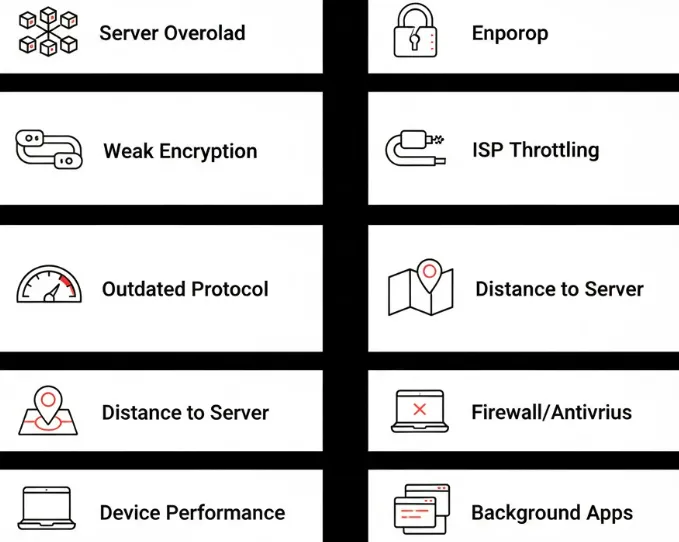
8 Hidden Reasons Why Your VPN is Slowing Down Your Internet
Think of your online data as a high-performance sports car. To get from your home to your destination via a VPN tunnel, there are seven potential bottlenecks that could slow you down:
1. Your "Network Ceiling": Base Bandwidth
This is the most rigid constraint. If your home broadband is capped at 50Mbps, no matter how premium your VPN is, your final speed will never exceed this limit. Your baseline internet speed is the foundation of your VPN performance.
2. Server Proximity and Latency (The Ping Factor)
Data transmission takes time. Your data has to travel from your device to the VPN server, and then from the server to the target website. The further away the VPN server is, the longer the "round-trip" time, which translates to slower speeds. Connecting to a server on the other side of the planet (e.g., connecting from Beijing to Argentina) adds significant physical latency (high Ping), noticeably dragging down your connection.
3. "Traffic Congestion": Overloaded Servers
When too many users connect to the same VPN server simultaneously, it’s like a highway bottleneck. As server load increases, the bandwidth available to you shrinks. This is the primary reason why many free VPNs offer such abysmal speeds.
-
Free VPNs aren't truly free; they monetize your data. In 2026, the tracking scripts used by these apps have become more complex, often running intensive background processes to analyze your traffic patterns in real-time. These "data-mining" layers consume both your device's RAM and your connection's overhead, creating a constant "micro-stutter" during high-speed activities like streaming or video calls.
4. WireGuard vs. OpenVPN: Choosing the Fastest Protocol
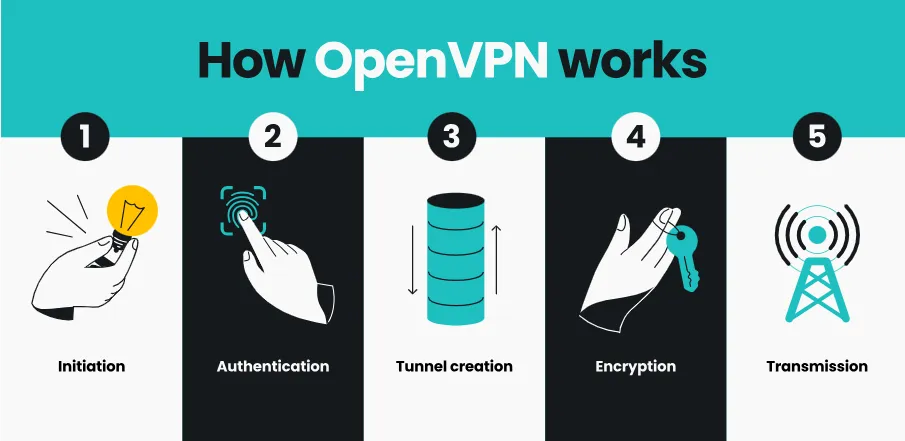
Think of VPN protocols as different vehicles. Some older protocols (like OpenVPN-TCP) are incredibly secure and stable but relatively slow. Newer protocols, such as WireGuard or ExpressVPN’s Lightway, offer a massive speed boost without compromising security. Each protocol balances speed and security differently:
-
OpenVPN: Reliable and secure, but average speed.
-
WireGuard / Lightway / IKEv2: Modern, high-security, and blazing fast—the current gold standard for speed.
-
PPTP: The fastest, but with very low security (not recommended for privacy).
5. "Heavy Armor": Excessive Security Overhead
A VPN’s core function is to encrypt and decrypt your data. This process requires additional computing power from your device (PC or smartphone). Higher encryption strength consumes more resources, which can impact speed. Furthermore, local security software or firewalls may scan VPN traffic, adding another layer of delay.
6. "The Long Way Round": Inefficient Data Routing
Both your ISP and your VPN provider determine the path your data takes. If your data is routed through a circuitous path or an inefficient node, your speed will suffer. A high-quality VPN knows how to map out the most efficient route.
7. Hardware Limitations: Devices and Routers
Sometimes, the bottleneck isn't the network or the software, but the physical hardware you are using. This is what we call an "unfixable brake" because no amount of software optimization can overcome the physical limits of a weak processor.
-
CPU-Intensive Encryption: VPNs rely heavily on encryption (like AES-256). Every piece of data sent or received must be encrypted and decrypted in real-time. This requires significant CPU processing power.
-
The Router Bottleneck: If you run a VPN directly on your router, a low-end or older router will likely struggle. Most standard home routers have very weak processors. When they try to handle high-speed VPN encryption, the CPU usage hits 100%, and your speed will plummet regardless of how fast your fiber optic connection is.
-
Older Mobile Devices: Older smartphones or tablets lack hardware-level encryption acceleration (like AES-NI found in modern CPUs). On these devices, the processor simply can't keep up with high-speed data streams, causing a noticeable lag.
-
The Fix: If hardware is your bottleneck, the only real solution is an upgrade. Use a router with a faster processor (or a dedicated VPN router), or run the VPN software on your modern PC/Phone instead of the router to leverage their more powerful CPUs.
If you are using an outdated router or an underpowered PC, it might struggle to handle the intensive encryption and decryption tasks required by a VPN. Additionally, a wired connection (Ethernet) is consistently more stable and faster than wireless (Wi-Fi).
8. ISP Throttling
Sometimes, the culprit isn't the VPN itself, but your Internet Service Provider (ISP). Some ISPs use Deep Packet Inspection (DPI) to identify certain types of high-bandwidth traffic, such as 4K streaming or large file downloads. Once identified, they may intentionally slow down your connection—a practice known as "Throttling."
Ironically, a VPN can sometimes solve this problem. Because a VPN encrypts your traffic, your ISP can no longer see what you are doing online. If they can't identify your traffic as "streaming" or "downloading," they may stop throttling your speed, potentially resulting in a faster connection with a VPN than without one.
What Real Users on Reddit Say About VPN Speed Drops
We analyzed recent threads on r/VPN and found that over 60% of speed complaints are actually caused by server congestion or outdated protocols. One user, u/NetworkPro2026, shared: "I was getting 20Mbps on OpenVPN, but as soon as I switched to NordLynx (WireGuard), it jumped to 280Mbps instantly." The takeaway? Your choice of protocol matters more than your raw bandwidth in 2026.
7 Practical Speed Optimization Tips
Now that you understand what slows you down, fixing it is straightforward. Here are the top tips I rely on daily:
1. Optimize Your Local Connection: Switch to "Nearest" or "Dedicated" Servers (The Root Solution)
This is the most direct and effective way to boost speed.
-
Choose Proximity: Always try to select the server node that is physically closest to you. If you are in Asia, connect to nodes in Hong Kong, Japan, South Korea, or Singapore.
-
Avoid Peak Loads: If a node feels slow, switch to another one! It’s likely that the current node is overcrowded. Switching to a node with a lower load can yield immediate improvements.
-
Look for Specialized Servers: Many premium VPNs offer servers optimized for "Streaming" or "P2P/Torrenting." These nodes are fine-tuned to provide a much smoother high-bandwidth experience.
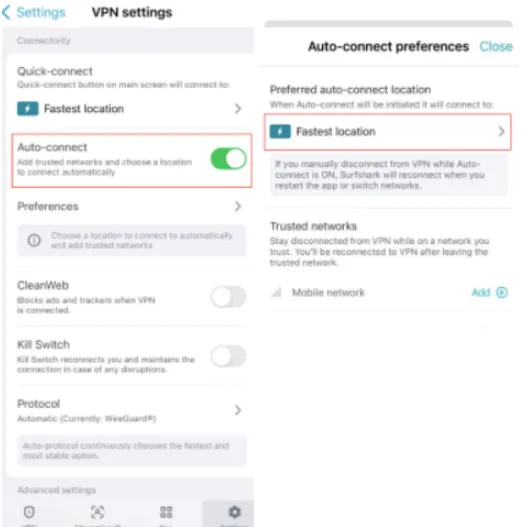
Many top-tier VPNs, such as Surfshark, host multiple server clusters within a single country or city.
Example using Surfshark: Suppose you want to connect to a Japanese server. Simply selecting "Japan - Tokyo" might still result in speeds too slow for HD video.
-
Strategy: Open the full server list. You might find options beyond just "Tokyo," such as "Osaka," "Nagoya," or specifically numbered "Japan" servers.
-
Action: Try switching from Tokyo to Osaka. Although they are in the same country, they represent different physical server clusters.
Why this works:
-
Load Balancing: The Tokyo server might be congested with too many users.
-
Routing: Switching to Osaka changes your data's path (routing), potentially bypassing congested network segments.
-
Result: This simple switch often helps you find a less busy, faster "exit point," significantly improving stability and speed.
Pro Tip: This method applies to any top VPN brand with a large network. Always check the server list for sub-cities or numbered nodes within a specific region.
2. Try Switching to the Latest VPN Protocols
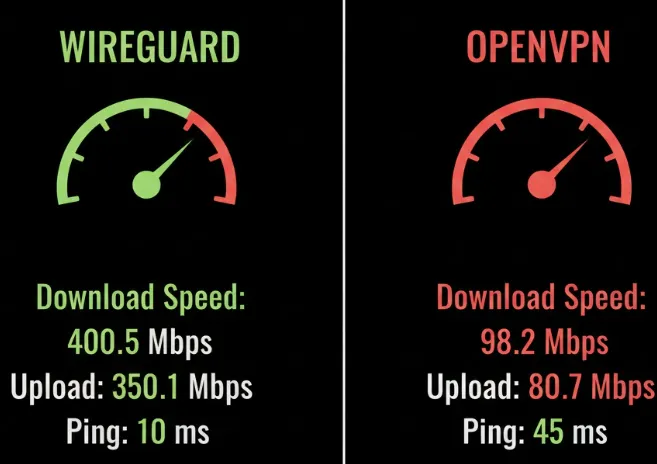
If you have already ruled out distance and server congestion, the next step is to check your VPN protocol. Using a modern protocol like WireGuard can lead to significant speed improvements.
Using the Surfshark desktop app (Windows/Mac) as an example, here is how to switch protocols:
-
Open Settings: Launch the app and click the "Settings" icon.
-
Go to VPN Settings: Navigate to the "VPN Settings" section.
-
Select Protocol: Look for the "Protocol" dropdown menu.
-
Make the Switch: You will see several options:
-
Automatic: Let the app choose the fastest available option for you.
-
WireGuard: Widely considered the fastest and most efficient modern protocol. This is the top recommendation for speed.
-
IKEv2: Offers a great balance of speed and security, commonly used on mobile devices.
-
OpenVPN (UDP): Faster than the TCP version, suitable for high-speed requirements.
-
OpenVPN (TCP): Sacrifices speed for maximum stability and bypass capabilities; use this only in extremely restrictive network environments.
3. Ditch Wi-Fi and Switch to a Wired Connection
If you have high demands for speed—such as online gaming or downloading large files—connect your computer directly to your router using an Ethernet cable. A wired connection eliminates speed loss caused by Wi-Fi signal attenuation and interference, providing the most stable foundation for your VPN. If you must use Wi-Fi, ensure your router is a modern model; outdated hardware often struggles to keep up with high-speed encryption.
4. Upgrade Your Home Broadband Bandwidth
If your base internet speed is too low (e.g., below 30Mbps), even the fastest VPN won't help. Contact your Internet Service Provider (ISP) and consider upgrading your broadband plan. You can use SpeedTest to check your original speed without a VPN to ensure that your home connection isn't the primary bottleneck.
5. Consider Switching to a More Reliable VPN Provider
If you have optimized your local network, switched servers, and tried different protocols but the speed is still lagging, it might be time to switch to a high-performance VPN provider.
Based on industry testing and technical data, here are five top-tier VPNs recommended for their speed, stability, and global server coverage. When choosing a high-speed VPN, focus on two key technical factors: WireGuard/Proprietary Protocol support and Network Scale/Bandwidth.
|
No. |
VPN Name |
Speed Advantage |
Key Technical Highlight |
Best Use Case |
|
1 |
Exceptional Consistency |
Lightway Protocol: Custom-built for speed and stability; connects instantly with ultra-low latency. |
Users seeking peak stability and top-tier performance in any region. |
|
|
2 |
Industry-Leading Speeds |
NordLynx Protocol: An optimized version of WireGuard; handles high-bandwidth data processing efficiently. |
Frequent large file downloads, 4K streaming, or users needing multiple device connections (up to 6). |
|
|
3 |
High Speed & Value |
WireGuard Support: Large server network with a mix of virtual and physical nodes for maximum availability. |
High-speed connection on a budget; supports unlimited simultaneous device connections. |
|
|
4 |
Private Internet Access (PIA) |
Pure Open Source |
Full WireGuard Support: Massive server count with ample bandwidth and no data caps. |
Tech enthusiasts and privacy purists; transparent data centers ensure both speed and security. |
|
5 |
Notable Performance Boost |
VPN Accelerator Technology: Uses WireGuard combined with routing optimizations to bypass congestion. |
Users with extreme privacy needs who still require high-speed performance. |
Summary: Why are they faster?
You might wonder why these premium VPNs consistently outperform free or mediocre ones. The secret lies in their underlying technical architecture and resource allocation:
-
Massive Infrastructure Investment: Top providers maintain thousands of high-bandwidth physical servers globally. This ensures that even during peak hours, user density per server remains low, preventing "traffic jams."
-
Next-Gen Protocols: They don't just use standard protocols; they optimize them. Whether it’s ExpressVPN’s Lightway or NordVPN’s NordLynx, these protocols are engineered with fewer lines of code, leading to faster data processing and lower battery consumption.
-
Advanced Routing Technology: These VPNs use smart algorithms to find the shortest and most efficient path for your data. By avoiding congested public network nodes, they significantly reduce latency.
-
Hardware Acceleration: Their server-side hardware is specifically tuned for AES-256 and ChaCha20 encryption, ensuring that the "security gate" operates at lightning speed without becoming a bottleneck.
In short, while security is the foundation of a VPN, technical innovation is what drives its speed. By following the tips above and choosing a provider that prioritizes performance, you can enjoy a secure internet experience without the frustration of lagging speeds.
6. Bypassing ISP Throttling: Reclaiming Your Paid Speed
As mentioned in the "Hidden Culprits" section, ISP Throttling is a common reason for slow speeds. Here is a deeper look at how a VPN acts as a "bypass" tool:
-
The ISP's Game: ISPs often use traffic shaping to manage their network load. If they see you are on Netflix, YouTube, or BitTorrent, they may put you in a "slow lane" to save bandwidth.
-
The VPN Countermeasure: When you turn on your VPN, your data is wrapped in an encrypted layer. To your ISP, all your traffic looks like a single stream of meaningless code directed to a VPN server. They can no longer distinguish between an HD video stream and a regular email.
-
Restoring Performance: If your ISP was throttling specific activities, the VPN effectively masks those activities, allowing you to bypass the artificial speed limits and access the full potential of your bandwidth.
-
Detection Note: While a VPN hides what you are doing, some ISPs can detect that you are using a VPN. If your speed drops only when the VPN is on, and you’ve tried all other tips, your ISP might be throttling VPN traffic itself. In this case, using "Obfuscation" or "Stealth" modes (though slower by nature) might be the only way to hide the VPN usage from the ISP.
7. Temporarily Adjust Security Settings (Proceed with Caution)
If you are in a safe and trusted network environment (e.g., at home) and urgently need maximum speed, you can try temporarily adjusting some advanced security features. Note: These actions may slightly reduce your privacy protection, so use them only when necessary.
-
Disable "Double VPN" or "MultiHop": These features route your traffic through two or more VPN servers. While they provide double the encryption, they also double the latency and cut speed significantly. For daily use, a single-hop connection is more than sufficient.
-
Toggle "NoBorders" or "Obfuscation" Modes: These features are designed to bypass strict network censorship. They often use "obfuscation" techniques to make VPN traffic look like regular HTTPS traffic, which adds significant processing overhead. If your network is not being actively restricted, turning these off can improve speed.
-
Adjust Encryption Levels (If Supported): Some VPNs allow you to switch from AES-256 to AES-128. AES-128 is still very secure but requires less computational power to encrypt and decrypt, which can help on older devices.
-
Use "Split Tunneling": This allows you to choose which apps go through the VPN and which use your regular internet. For example, you can let your web browser use the VPN while letting your games or system updates run via your local network to avoid unnecessary speed loss.
- Split Tunneling: The Ultimate "No-Lag" Setup for Daily Use - Split Tunneling is the most effective way to enjoy the benefits of a VPN without sacrificing your overall network performance. It allows you to decide which applications use the VPN tunnel and which connect directly to your ISP.
1. Solving the High-Bandwidth Conflict
In a typical setup, your VPN encrypts everything. If Windows starts a 5GB system update in the background while you are trying to stream a 4K video or join a Zoom call, the VPN encryption process and the extra routing will significantly slow you down. This "tunnel congestion" is the #1 reason for unexpected slowdowns.
2. Practical Configuration: Browser vs. System
To achieve an "invisible" speed boost, you should configure your VPN to only protect what matters:
-
The Strategy: Go to your VPN's Settings > Split Tunneling. Select the option "Only allow selected apps to use the VPN."
-
The Selection: Add only your web browser (e.g., Google Chrome, Firefox, or Brave).
-
The Result: Your browsing session remains secure and geo-unblocked. Meanwhile, high-bandwidth system updates, Steam game downloads, and cloud syncing (OneDrive/Google Drive) will bypass the VPN entirely. They will use your raw, unencrypted ISP bandwidth, ensuring that background tasks never interfere with your active work or entertainment.
-
- Split Tunneling: The Ultimate "No-Lag" Setup for Daily Use - Split Tunneling is the most effective way to enjoy the benefits of a VPN without sacrificing your overall network performance. It allows you to decide which applications use the VPN tunnel and which connect directly to your ISP.
Frequently Asked Questions(FAQ)
Q: Which VPN protocol offers the best speed?
A: In the current VPN landscape, WireGuard is widely recognized as the fastest all-around protocol. However, some proprietary protocols developed by top providers offer comparable or even superior performance. Here is a breakdown:
-
WireGuard (The Gold Standard): Extremely lightweight (only about 4,000 lines of code compared to OpenVPN's 100,000+), WireGuard is designed for speed. It establishes connections almost instantly and offers significantly higher throughput and lower latency than traditional protocols. It is the best choice for gaming and high-definition streaming.
-
Lightway (ExpressVPN): Specifically engineered by ExpressVPN to be "always on" and blazing fast. Like WireGuard, it is lightweight and efficient, but it also has superior handling for network changes (e.g., switching from Wi-Fi to cellular) and connects even faster than WireGuard in many scenarios.
-
NordLynx (NordVPN): This is NordVPN's custom implementation of WireGuard. It combines the raw speed of WireGuard with NordVPN's proprietary double NAT system for enhanced privacy. In many third-party tests, NordLynx consistently tops the speed charts.
-
IKEv2/IPsec: A strong contender for mobile users. While not as modern as WireGuard, it is very fast and exceptionally good at maintaining a stable connection when switching networks.
-
OpenVPN (UDP/TCP): The "old reliable." While highly secure and great for bypassing firewalls (especially in TCP mode), it is significantly slower than WireGuard or Lightway due to its heavy code base and older architecture.
The Verdict: If speed is your priority, always look for WireGuard (or its variants like NordLynx) or ExpressVPN's Lightway. Use OpenVPN only as a backup or if you have specific security requirements that the newer protocols don't meet.
Q: Does my internet connection affect VPN speed?
A: Absolutely. Your internet connection is the foundation upon which your VPN operates. You can think of your local internet speed as the "diameter of the pipe" through which all data must flow.
-
The Absolute Ceiling: A VPN cannot create bandwidth out of thin air. If your home broadband is 50Mbps, your VPN speed will always be slightly less than 50Mbps (due to encryption overhead). It can never exceed your ISP's provided speed.
-
Connection Stability: If your Wi-Fi signal is weak or your ISP's connection is unstable, your VPN will struggle to maintain its encrypted tunnel. This often leads to frequent disconnections or "stuttering" in speed.
-
Latency (Ping): Your base latency to the internet determines the minimum delay you will experience. A VPN adds its own processing time and travel time to this base latency. If your original connection already has high lag, a VPN will only make it more noticeable.
-
The "Bottleneck" Effect: Even with the fastest VPN in the world, if your local connection is poor, you will experience slow speeds. This is why optimizing your local network (using Ethernet, upgrading your router) is often the first step in fixing VPN speed issues.
Q: Can a free VPN slow down my internet?
A: Yes, almost certainly. While the word "free" is tempting, free VPNs often come with significant performance trade-offs that can make your internet feel incredibly sluggish.
-
Severely Overloaded Servers: Free VPNs usually offer a very small number of servers for a massive number of users. This leads to extreme congestion, where the available bandwidth is divided among hundreds or thousands of people simultaneously.
-
Intentional Bandwidth Throttling: Some free providers intentionally limit your speed to encourage you to upgrade to their paid "Premium" plans.
-
Outdated Protocols: Many free VPNs use older, less efficient protocols that are much slower at processing data compared to modern standards like WireGuard.
-
Resource Cost: Operating a global server network is expensive. If you aren't paying for the service, the provider might be cutting costs on server quality or bandwidth, resulting in a poor user experience.
-
The "Data Harvesting" Overhead: Some free VPNs make money by tracking your browsing habits and selling the data. The background processes required for this tracking can sometimes add extra latency and slow down your overall connection.
Recommendation: For a fast and secure experience, it is almost always better to invest in a reputable paid VPN or use the limited free tier of a premium provider (like Proton VPN) which does not throttle speed as aggressively as "totally free" unknown apps.
Q: Can a VPN speed up my internet connection?
A: In most cases, no, but in specific scenarios, yes. Generally, a VPN introduces a slight overhead due to encryption and routing, which typically reduces your speed by 5-20%. However, there are two major exceptions:
-
Bypassing ISP Throttling: If your ISP intentionally slows down your connection for specific activities like streaming or gaming, a VPN can hide your activity. Since the ISP can't see what you're doing, they can't apply the throttle, effectively "speeding up" your connection to its original potential.
-
Optimizing International Routing: Sometimes, your ISP's routing to a specific international website is inefficient. A premium VPN provider might have a more direct or optimized route to that same destination via its private server network, resulting in lower latency and faster page loads.
While a VPN is not a magic tool to exceed your home broadband's limit, it is an excellent tool for reclaiming the speed you've already paid for if it's being artificially limited.
PS: All images in this article are sourced from the merchant's official website and are copyrighted by the merchant.