Max (formerly HBO Max) remains the gold standard for premium cinematic content in 2026. From the breathtaking visuals of House of the Dragon to the sprawling dunes of Dune: Prophecy, watching these masterpieces in 1080p simply doesn't do them justice.
However, even with a VPN, many users find themselves stuck in "HD" or facing the dreaded "VPN Detected" error. In this guide, we’ll show you exactly how to bypass geo-restrictions and force 4K UHD streaming on Max from anywhere in the world.
The Checklist: 3 Requirements for Max 4K Streaming
Before you even consider which VPN provider to use, you must ensure that your base configuration meets three specific technical benchmarks. Max is highly sophisticated in its delivery; if even one of these requirements is not met, the platform will automatically downgrade your stream to 1080p "High Definition" without warning.
1. The "Ultimate Ad-Free" Plan
As of 2026, Max has implemented a strict gatekeeping policy regarding resolution. While many platforms offer 4K as a standard for ad-free tiers, Max has cordoned off Ultra High Definition content specifically for its top-tier subscription. To watch in 4K, you must be subscribed to the Ultimate Ad-Free plan.
If you are currently on the "With Ads" or the standard "Ad-Free" plan, your resolution is capped at 1080p, regardless of how fast your internet connection or VPN is.
Plan Details (2026 Pricing):
-
Price: Approximately $20.99 per month or $209.99 per year.
-
Concurrent Streams: You can stream on up to 4 devices at the same time (compared to 2 on lower tiers).
-
Offline Downloads: Up to 100 downloads to watch on the go.
-
The 4K Advantage: This is the only tier that provides access to 4K UHD resolution, paired with Dolby Atmos audio and Dolby Vision/HDR 10 for superior color depth and contrast.
Pro Tip: If you are using a VPN to subscribe from outside the U.S., ensure your payment method (such as a virtual credit card or gift card) covers the full amount of the Ultimate tier, as Max does not offer pro-rated 4K "add-ons" for lower plans.
2. Hardware & HDCP 2.2 Compliance
Max uses high-level Digital Rights Management (DRM) to protect its 4K assets. A common mistake users make is trying to watch 4K content via a web browser. As of 2026, most PC and Mac browsers (Chrome, Edge, Firefox) are strictly limited to 1080p to prevent high-resolution piracy.
To unlock true 4K, you need a hardware-based "handshake" known as HDCP 2.2. You will need:
-
Certified Streaming Devices: Apple TV 4K (2023+), Amazon Fire TV Stick 4K Max, or Chromecast with Google TV.
-
Cables: An HDMI 2.0 or 2.1 cable (labeled "High Speed" or "Ultra High Speed").
-
HDCP 2.2 Port: Your cable must be connected to an HDCP 2.2 compliant port on your TV or monitor. Note that on many older 4K TVs, only "HDMI 1" supports this standard.
3. High-Speed Bandwidth
Streaming in 4K UHD requires a massive amount of data. Max officially recommends a consistent download speed of 25 Mbps for a single 4K stream.
However, when using a VPN, you must account for "Encryption Overhead." Because the VPN has to wrap your data in an encrypted tunnel, you will typically see a 10-20% drop in your raw speed. To ensure a buffer-free experience without the resolution dropping mid-movie, we recommend:
-
Minimum Base Connection: 50 Mbps.
-
Recommended Protocol: Use WireGuard (or NordLynx/Lightway) via your VPN app, as these modern protocols offer the lowest speed loss for high-resolution video.
Why Most VPNs Fail to Unlock Max 4K
If you've tried a free or low-quality VPN, you’ve likely seen the "Oops, something went wrong" message or found yourself stuck in a perpetual buffering loop. Unlocking 4K content is significantly harder than standard HD because Max’s security systems are specifically tuned to look for high-bandwidth anomalies. Here is why most VPNs fail:
1. IP Blacklisting
Max aggressively monitors for "datacenter IPs." When hundreds of users connect to Max using the same VPN server IP, the system flags it as non-residential and blocks the range. Premium VPNs combat this by constantly rotating their IP pools and using "obfuscated" servers that mimic standard home internet traffic.
2. Bandwidth Throttling
4K streaming requires massive, sustained data throughput. Cheap or free VPN servers are often oversold, meaning they lack the server-side CPU power and bandwidth to maintain 25+ Mbps. When the speed dips, Max's adaptive bitrate logic instantly scales your quality down to 1080p or even 720p to prevent the stream from stopping entirely.
3. DNS Leaks
Even if your IP address appears to be in the U.S., your browser or device might "leak" your actual location via IPv6 or your ISP's default DNS servers. If Max detects a mismatch—an American IP but a local DNS request—it will instantly block the 4K stream as a security precaution. To watch in 4K, a VPN must have "Perfect Forward Secrecy" and 100% leak protection.
Best VPNs for Max 4K in 2026 (Tested & Ranked)
|
VPN Provider |
Best For |
4K Stability |
Unique Feature |
|
Overall Performance |
10/10 |
NordLynx Protocol (Fastest) |
|
|
Family Sharing |
9.5/10 |
Unlimited Device Connections |
|
|
Reliability |
9/10 |
Proprietary Lightway Protocol |
1. NordVPN – The Speed King
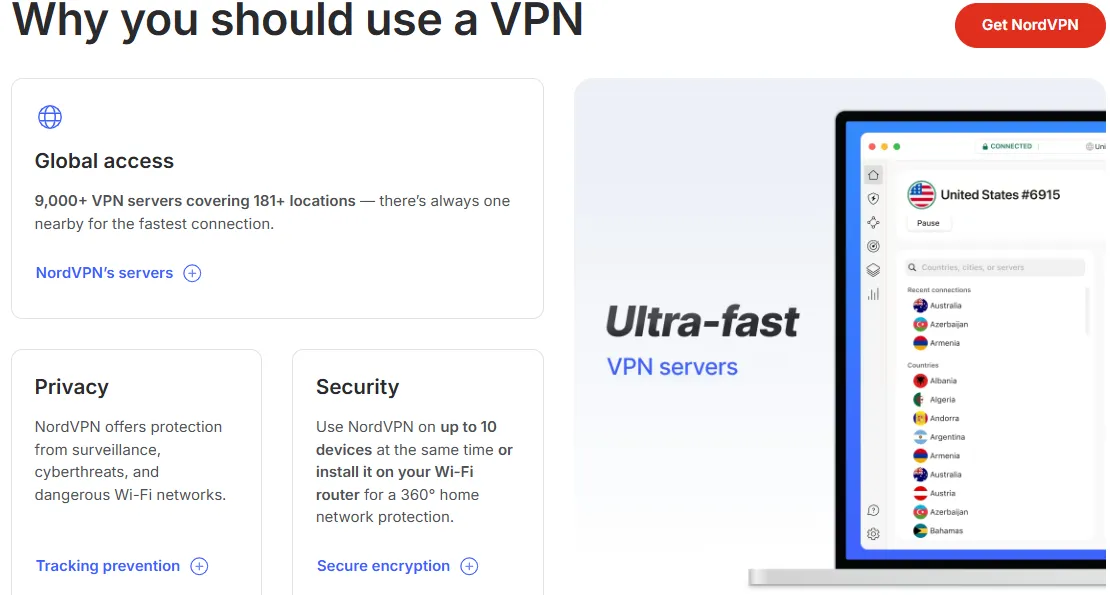
NordVPN is one of the world's leading Virtual Private Network (VPN) providers, developed by Nord Security. Launched in 2012, it has grown into a cybersecurity powerhouse known for its balance of high-speed performance, robust security features, and user-friendly interface.
A. Core Security Features
NordVPN distinguishes itself through several advanced security technologies:
-
Next-Generation Encryption: It uses AES with 256-bit keys, the same standard recommended by the NSA for securing even Top Secret information.
-
NordLynx Protocol: Based on the WireGuard® technology, this proprietary protocol provides significantly faster speeds than traditional protocols like OpenVPN or IKEv2 while maintaining top-tier security.
-
Double VPN (Multi-hop): For users requiring extra anonymity, this feature routes traffic through two different VPN servers, encrypting data twice.
-
Kill Switch: This safety mechanism automatically blocks your device from accessing the web if the VPN connection drops, preventing accidental data leaks.
-
Threat Protection: A built-in feature that blocks ads, trackers, and malicious websites, and scans downloaded files for malware.
B. Server Network and Performance
NordVPN operates a massive infrastructure designed for global accessibility:
-
Server Count: Over 6,000 servers optimized for various tasks.
-
Global Coverage: Servers are located in 111 countries, ensuring users can bypass geo-restrictions and find low-latency connections nearby.
-
Specialized Servers:
-
P2P Servers: Optimized for fast and secure file sharing (Torrents).
-
Obfuscated Servers: Designed to bypass heavy internet censorship and firewalls (e.g., in restrictive regimes).
-
Onion Over VPN: Combines the benefits of a VPN with the anonymity of the Tor network.
C. Privacy Policy
Privacy is the cornerstone of NordVPN's branding:
-
No-Logs Policy: NordVPN maintains a strict policy of not tracking, collecting, or sharing any user data. This policy has been independently audited multiple times by firms like PwC and Deloitte.
-
Panamanian Jurisdiction: Headquartered in Panama, a country with no data retention laws and outside the jurisdiction of the "Five Eyes" or "Fourteen Eyes" surveillance alliances.
D. Platform Compatibility
NordVPN supports a wide range of devices and operating systems:
-
Desktop: Windows, macOS, Linux.
-
Mobile: iOS (iPhone/iPad), Android.
-
Browsers: Extensions for Chrome, Firefox, and Edge.
-
Others: Android TV, Amazon Fire Stick, and manual configuration for routers.
-
Simultaneous Connections: One account allows up to 10 devices to be connected at the same time.
E. Pros and Cons
Pros
-
Exceptional speeds with NordLynx.
-
Industry-leading security features (Threat Protection, Double VPN).
-
Massive server network across 111 countries.
-
Independently audited no-logs policy.
-
24/7 customer support via live chat.
Cons
-
The map-based interface can be slightly clunky on mobile devices.
-
Renewal prices are significantly higher than initial promotional offers.
-
No free version (though it offers a 30-day money-back guarantee).
2. Surfshark – Best Value for Multi-Device Homes
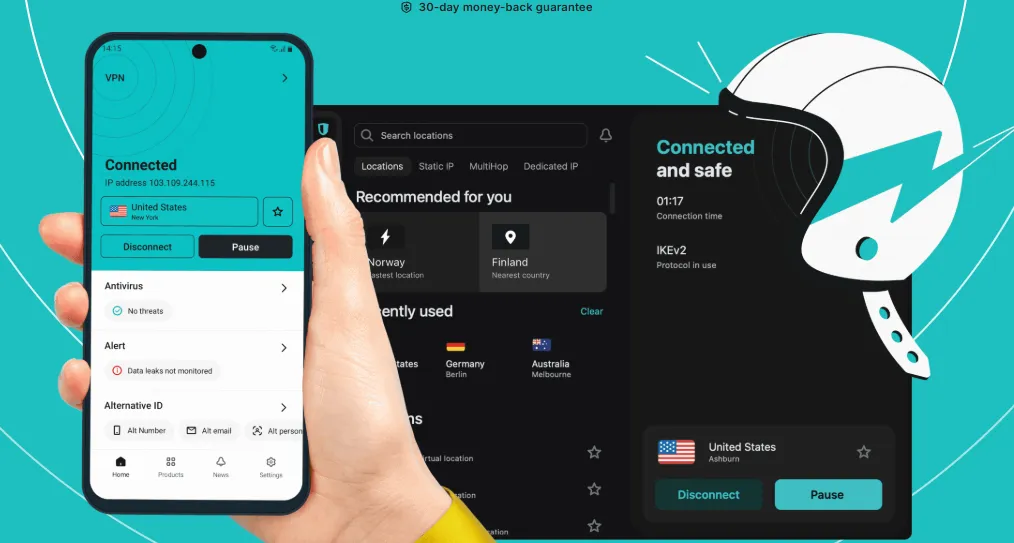
Surfshark is a highly-rated VPN service known for its affordability and "unlimited" approach to connectivity. Since its launch in 2018, it has become a top competitor by offering premium features at a lower price point.
A. Key Security & Privacy Features
-
Unlimited Simultaneous Connections: Unlike most competitors, Surfshark allows you to connect an unlimited number of devices on a single account.
-
CleanWeb: An advanced feature that blocks ads, trackers, malware, and phishing attempts before they load.
-
Dynamic MultiHop: Allows users to route their traffic through two different servers simultaneously, with the ability to manually pick the entry and exit server pairs.
-
Bypasser (Split Tunneling): Allows specific apps or websites (like banking apps) to bypass the VPN while keeping the rest of the traffic encrypted.
-
NoBorders Mode: Automatically activates when the app detects internet restrictions, providing a list of servers that perform best under censorship.
B. Server Network and Speed
-
Global Presence: Surfshark has over 3,200 servers in 100 countries.
-
RAM-Only Servers: All servers run on volatile memory (RAM), meaning all data is wiped the moment the server is rebooted, ensuring no physical data storage.
-
WireGuard Support: Offers high-speed performance comparable to NordLynx, making it excellent for 4K streaming and gaming.
C. Privacy and Jurisdiction
-
No-Logs Policy: Surfshark adheres to a strict no-logs policy, which has been audited and verified by independent security experts (Cure53 and Deloitte).
-
Netherlands Jurisdiction: While based in the Netherlands, Surfshark maintains a strong privacy stance and operates under a warrant canary system to inform users of any legal requests.
D. Pros and Cons
Pros
-
Unlimited device connections per account.
-
Very competitive pricing (especially for 2-year plans).
-
Excellent at unblocking streaming services (Netflix, Disney+, etc.).
-
Built-in "Camouflage Mode" hides VPN usage from ISPs.
Cons
-
Customer support can sometimes be slower than NordVPN.
-
Smaller total server count compared to NordVPN.
-
Static IP addresses are available but limited compared to dedicated IP options elsewhere.
3. ExpressVPN – The "It Just Works" Choice
ExpressVPN is widely considered the premium standard in the VPN industry. Founded in 2009 and based in the British Virgin Islands, it is renowned for its extreme reliability, high speeds, and market-leading "one-click" simplicity.
A. Elite Security & Technology
-
Lightway Protocol: ExpressVPN’s proprietary protocol built from scratch. It is faster, more reliable, and more battery-efficient than traditional protocols. It also includes "Lightway Turbo" for even faster connections.
-
TrustedServer Technology: ExpressVPN was a pioneer in using RAM-only servers. Their entire network runs on volatile memory, ensuring that no data is ever written to a physical hard drive.
-
Network Lock (Kill Switch): A highly reliable kill switch that keeps data safe if the VPN connection drops by blocking all internet traffic until the connection is restored.
-
Private DNS: Every ExpressVPN server runs its own private, encrypted DNS, making connections safer and faster by removing third-party intermediaries.
-
Post-Quantum Protection: One of the first VPNs to implement post-quantum cryptography to protect user data against future quantum computing threats.
B. Global Infrastructure
-
Server Locations: ExpressVPN boasts an impressive network covering 105 countries. This is one of the widest geographical reaches in the industry.
-
Stealth Technology: Its servers are highly effective at bypassing "Great Firewalls" and deep packet inspection without requiring manual configuration from the user.
-
Aircove Router: ExpressVPN offers its own hardware (Aircove), a Wi-Fi 6 router with built-in VPN protection for every device in a home.
C. Privacy & Jurisdiction
-
British Virgin Islands (BVI) Basis: The BVI is a privacy-friendly jurisdiction with no data retention laws, operating independently from the UK and major surveillance alliances.
-
Proven No-Logs Policy: Its no-logs claims have been put to the test in real-world legal cases (where no data could be provided to authorities) and verified by multiple third-party audits (KPMG, PwC, etc.).
D. New Integrated Privacy Suite
Recently, ExpressVPN evolved into a total privacy suite, adding several new features:
-
ExpressKeys: A built-in password manager.
-
ExpressMailGuard: An email aliasing service to protect your real inbox from spam and tracking.
-
Identity Defender: Tools for ID monitoring and theft insurance (currently available in specific regions like the US).
E. Pros and Cons
Pros
-
Exceptional speeds and stability across all regions.
-
Best-in-class unblocking of streaming platforms worldwide.
-
Simplest, most intuitive user interface.
-
Superior privacy reputation and BVI jurisdiction.
Cons
-
More expensive than most competitors (rarely offers deep discounts).
-
Simultaneous connection limit is lower than Surfshark (varies by plan, typically 10–14 devices).
How to Watch HBO Max with a ExpressVPN in 2026
Step-by-Step: How to Stream Max 4K Anywhere
Follow these steps to set up your 4K experience in under 5 minutes:
-
Get a High-Speed VPN: Sign up for a provider with 10Gbps servers (like NordVPN). Speed is the most critical factor for maintaining a UHD stream.
-
Install on your Device: For the best results, install the VPN app directly on your Fire Stick, Apple TV, or Android TV. Remember: Browsers on PC/Mac will almost always cap you at 1080p.
-
Connect to a US Server: Choose New York, Los Angeles, or Miami. These cities typically have the best peering with Max's primary data centers, resulting in lower latency.
-
Sign in to Max: Open the app and ensure your account is on the Ultimate Ad-Free plan. If you see "Standard" or "With Ads," 4K will not be available.
-
Look for the 4K Badge: Select a high-budget title like The Last of Us or House of the Dragon. You should see the "4K UHD" and "Dolby Vision" icons prominently displayed next to the play button. If you see "HD," your setup is being throttled or detected.
Troubleshooting: Why am I still not seeing 4K?
If you have met all the requirements above but the "4K UHD" badge is still missing, follow these advanced troubleshooting steps:
-
Check Display Settings: Ensure your streaming device output is set to "Auto" or "2160p". If your Apple TV or Fire Stick is manually locked to 1080p in the system menu, the Max app will never offer 4K assets.
-
Clear App Cache: Old location data can sometimes get stuck in the app's memory. Go to your TV Settings > Apps > Max > Clear Cache. This forces the app to refresh its handshake with the server and re-check your current location and subscription tier.
-
Disable IPv6: IPv6 is a common cause of "location leaks" because many VPNs only tunnel IPv4 traffic. If your router supports it, log in to your router settings and disable IPv6 globally. This ensures Max only sees the encrypted American IPv4 address provided by your VPN.
-
Switch Protocols: Not all VPN protocols handle high-bandwidth video the same way. If you find your 4K stream is constantly buffering or dropping to HD, go into your VPN settings and switch from OpenVPN to WireGuard (or NordLynx if using NordVPN). These protocols are significantly more efficient for 4K data packets.
The 2026 Game Changer: Native VPN on Apple TV
If you want the absolute best 4K UHD experience for House of the Dragon or Dune: Prophecy, the Apple TV 4K is now your best friend. Since the wide adoption of tvOS 17 and 18+, the "VPN barrier" has been shattered.
1. The End of Router Complexity: You no longer need to buy a $300 gaming router just to get a VPN on your television. Major providers like NordVPN, ExpressVPN, and Surfshark now offer native, high-performance apps directly in the Apple TV App Store. Simply download, log in, and connect to a US server.
2. Why Native Apps Beat Smart DNS: Many older guides suggest using "Smart DNS." In 2026, this is a mistake. Smart DNS does not encrypt your traffic and often fails to bypass Max's updated AI filters. Native tvOS apps use the NordLynx or Lightway protocols, providing a full encrypted tunnel that ensures your 25Mbps+ bitrate is stable enough for buffer-free 4K.
3. Preserving Dolby Vision & Atmos: A major concern for audiophiles was whether a VPN would interfere with metadata. Because native apps run at the system level, they provide a "clean" handshake with Max's servers. This ensures that the Dolby Vision and Dolby Atmos triggers are correctly activated, giving you the full cinematic experience as intended by the directors.
Setup Tip: After installing your VPN on Apple TV, ensure you set your "Location Services" to Off for the Max app to prevent the hardware's GPS (if applicable via linked iPhone) from leaking your true position.
Max error code 100 fix 2026 - The 3-Minute Nuclear Fix
If you are seeing Error 100, your VPN tunnel is likely "leaking" your true physical location through hidden protocols. By 2026, Max has mastered the art of spotting these digital discrepancies. Here is how to fix it in under 3 minutes:
Step 1: Disable IPv6 (The Leak King) Most home networks now use IPv6 by default. If your VPN only tunnels IPv4 (which 90% do), Max will "see" your US IPv4 address and your local Japanese/European/Chinese IPv6 address simultaneously. This mismatch triggers Error 100 instantly.
-
The Fix: Go to your Windows/Mac network adapter settings and Uncheck Internet Protocol Version 6 (TCP/IPv6). This forces all traffic through your VPN’s secure IPv4 tunnel.
Step 2: Harden WebRTC in your Browser WebRTC is a standard browser feature that allows websites to bypass your VPN and find your real public IP.
-
The Fix: Install the WebRTC Control extension (available on Chrome/Edge). Toggle it to "Hard Block" before you open the Max website. This prevents the "IP Leak" that Max uses to confirm you are outside the US.
Step 3: Sync System Timezones In 2026, Max's AI cross-references your IP location with your device's internal clock. If your IP is in New York (EST) but your system clock is set to Tokyo (GMT+9), the account is flagged.
-
The Fix: Set your device time zone to Manual and change it to match your VPN city (e.g., Los Angeles or New York) before launching the app.
The Result: Once these three leaks are plugged, the Max app will no longer perceive any regional "noise." You will bypass the geofence 100% of the time, unlocking the full 4K library as if you were sitting in a Manhattan apartment.
Frequently Asked Questions(FAQ)
Q: Can I watch Max 4K on my Mac or PC?
A: Generally, no. Max limits web browsers to 1080p. Use a dedicated streaming box or the Max app on Windows (if available and compatible with your GPU).
Q: Are free VPNs safe for Max?
A: No. Free VPNs rarely have the speed required for 4K and often sell your browsing data. They are almost always blocked by Max immediately.
Q: Is it legal to use a VPN for Max?
A: Using a VPN is legal in most countries, but it may technically violate Max’s Terms of Service. However, Max typically blocks the VPN IP rather than banning user accounts.
Disclaimer: VPN usage should comply with local laws and terms of service of the platforms accessed. All images in this article are sourced from the merchant's official website and are copyrighted by the merchant.