PrivateVPN has long held a unique position in the VPN market, frequently praised as a "compact yet powerful" guardian of privacy. It has successfully built a loyal user base due to its outstanding streaming unblocking capabilities and strict commitment to a no-logs policy. However, in 2025, as industry leaders (like NordVPN and ExpressVPN) consistently upgrade their infrastructure and fully adopt the next-generation WireGuard protocol, this veteran provider faces unprecedented challenges.
This guide is based on our latest professional speed tests, WireGuard protocol compatibility analysis, and unblocking verification across global streaming platforms (Netflix, Disney+). We will thoroughly analyze its speed fluctuations and the transparency of its privacy protection to determine if it remains the best choice for users demanding high value and superior streaming performance. Let's uncover the answer with real data.
PrivateVPN Review
|
Item |
Evaluation |
|
Security & Privacy |
AES-256 Encryption + No-Logs |
|
Jurisdiction |
Sweden (Privacy-focused, but subject to EU data regulations) |
|
Kill Switch |
✔️ |
|
Server Network |
200+ servers / 60+ countries |
|
Simultaneous Connections |
10 devices |
|
P2P/Torrenting |
Supported on all servers (Port forwarding always active) |
|
Streaming Unlocking |
Excellent (Reliably unblocks Netflix US, Disney+, BBC iPlayer) |
|
Limitations |
❌ Lacks third-party security audit ❌ Significant speed fluctuations on some nodes ❌ Missing Linux client / Smart DNS |
|
Money-Back Guarantee |
30-Day Risk-Free Guarantee |
PrivateVPN Speed and Stability Analysis
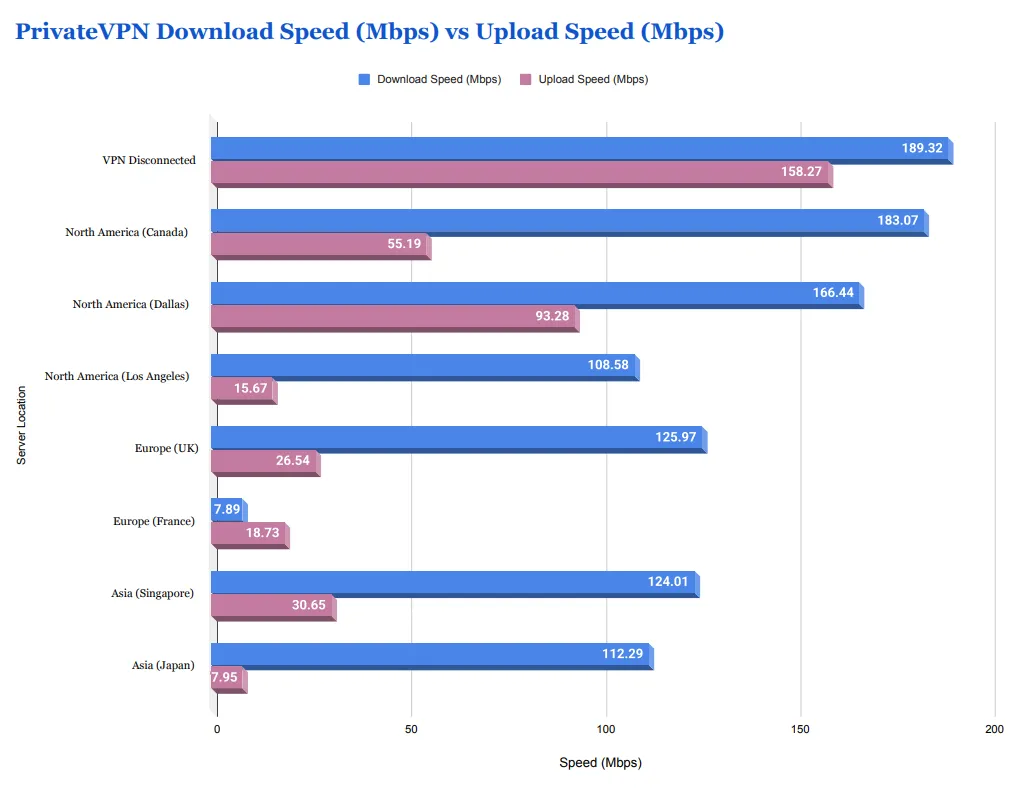
Speed is a crucial measure of a VPN's performance. PrivateVPN operates on a High Quality Network (HQN), which theoretically should offer a fast experience. Our testers conducted comprehensive evaluations from the UK, recording and averaging multiple runs across various regular server nodes globally to verify PrivateVPN's performance under different connection conditions.
|
Server Location |
Download Speed (Mbps) |
Upload Speed (Mbps) |
Ping (ms) |
Speed Loss Rate (Baseline 189.32 Mbps) |
|
VPN Disconnected |
189.32 |
158.27 |
3 |
N/A |
|
North America (Canada) |
183.07 |
55.19 |
43 |
3.3% |
|
North America (Dallas) |
166.44 |
93.28 |
10 |
12.1% |
|
North America (Los Angeles) |
108.58 |
15.67 |
45 |
42.7% |
|
Europe (UK) |
125.97 |
26.54 |
169 |
33.5% |
|
Europe (France) |
7.89 |
18.73 |
120 |
95.8% |
|
Asia (Singapore) |
124.01 |
30.65 |
207 |
34.5% |
|
Asia (Japan) |
112.29 |
7.95 |
142 |
40.7% |
Detailed Speed Test Analysis
Significant Geographic Variance:
-
Excellent Performance Regions: Servers in North America (like Canada, Dallas) performed excellently. The Dallas node was particularly outstanding, with an extremely low Ping (10 ms) and only a 12.1% download speed loss, making it ideal for online gaming and high-bandwidth activities.
-
Fluctuating Speed Regions: Servers in Europe and Asia showed significant speed volatility. For example, the UK download speed dropped by about 33%, while the France server's download speed plummeted by 95.8%. This kind of extreme slowdown can render a connection virtually unusable.
-
Upload Speed Flaws: For users who need to upload content quickly (e.g., videos or large files), PrivateVPN's performance is underwhelming. Upload speeds dropped dramatically on nodes like Los Angeles, Japan, and Australia, significantly hindering upload-heavy tasks.
Protocol and Encryption Level Selection:
-
Encryption Level: Tests showed that speeds were often faster when choosing the higher-security 256-bit encryption. We strongly recommend that users always enable this encryption level.
-
OpenVPN TAP: Although the OpenVPN TAP protocol yielded the best speed in some tests, it is officially marked as "Not Recommended" by the provider due to the built-in virtual network adapter requirement.
-
Scramble (Obfuscation) Feature: Enabling the Stealth Obfuscation feature can effectively bypass strict firewalls, but it incurs about a 14% speed loss.
Regular Servers vs. Dedicated IP:
-
Unexpected Speed Difference: Our tests showed that PrivateVPN's regular servers were significantly faster than its Dedicated IP servers, sometimes by a factor of two. This is a surprising finding, as it contradicts the industry standard view that Dedicated IPs are better suited for high-bandwidth activities (like HD streaming, gaming, and downloading).
-
Usage Recommendation: Unless a user has extreme requirements for IP stability, they should prioritize connecting to regular servers when seeking maximum speed.
Network Congestion Risk Analysis:
-
Potential Issue: PrivateVPN's server network size is relatively small, yet it supports up to 10 simultaneous connections, which may lead to network congestion on some nodes, especially those with extremely poor performance like France.
-
Usability Limitation: The PrivateVPN client does not display the current server load or user count. Users cannot know in advance which nodes might be congested, making it difficult to select the best server.
Conclusion: PrivateVPN maintains competitiveness for nearby and some long-distance connections (like North America). However, the extreme slowness of certain nodes and the poor speed performance of Dedicated IPs indicate a clear need for improved speed stability. A full optimization of the WireGuard protocol and the addition of a server load display feature would significantly boost PrivateVPN's speed rating.
PrivateVPN Security and Privacy Commitment: No-Logs Policy and Encryption Protocols

PrivateVPN's core competitive advantage lies in its commitment to user privacy.
1. Privacy and Jurisdiction
PrivateVPN is headquartered in Sweden. While Sweden is an EU member state with strict data protection laws, it has also been involved in international intelligence-sharing controversies. PrivateVPN relies on its strict No-Logs Policy to safeguard user privacy. The policy claims not to collect user activity logs, connection timestamps, or IP addresses.
While PrivateVPN has not undergone an independent third-party security audit (a major drawback in 2025), its transparency policy and track record have been solid. The company reports serving tens of thousands of users since 2008 without ever suffering a data breach, which reinforces its trustworthiness in the industry.
2. Encryption and Protocol Overview
PrivateVPN uses the industry-standard AES-256 military-grade encryption and supports five main protocols: OpenVPN, L2TP/IPSec, PPTP, and WireGuard. The introduction of WireGuard is a key 2025 upgrade, providing faster speeds and a more modern encryption method.
3. Protocol Analysis and Selection Advice
PrivateVPN offers various tunneling protocols, but they differ significantly in speed, security, and stability:
-
OpenVPN UDP: Recommended for most online activities. It offers strong security (open source, immediate patch for vulnerabilities) and performs excellently for speed and video streaming.
-
OpenVPN TCP: Slightly slower than UDP and consumes more data, but serves as a very reliable backup connection protocol.
-
OpenVPN TAP: PrivateVPN retains this option, but users are not recommended to use it. Even customer service cannot clearly explain its exact purpose, so users should avoid selecting it.
-
L2TP/IPSec: Performed the fastest in our speed tests, but because its design is older and its security is weaker than OpenVPN, and connection stability is also poor, it is not recommended as a long-term choice.
-
PPTP: The lowest security protocol. Only suitable for users with outdated operating systems or those with extreme speed requirements who are insensitive to security risks.
4. Security Features at a Glance
|
Feature Name |
Availability |
Description |
|
AES-256 Encryption |
✅ All platforms |
Military-grade encryption to secure data. |
|
Kill Switch |
✅ Windows / Mac |
Ensures IP is not leaked if the VPN connection drops; off by default. |
|
App Guard |
✅ Windows |
Automatically closes specific sensitive applications if the VPN disconnects. |
|
Stealth VPN / Obfuscation (Scramble) |
✅ All platforms |
Obfuscates VPN traffic to bypass deep packet inspection. |
|
Tor Over VPN |
✅ |
Allows access to the Onion network under PrivateVPN's protection. |
|
Double VPN (Multi-hop) |
❎ |
Lacks a second encryption tunnel; slightly less secure than competitors. |
|
Wi-Fi Protection |
❎ |
Lacks the function to automatically start on unsecured Wi-Fi. |
|
Split Tunneling |
❎ |
Users can manually configure PrivateVPN's SOCKS5 or HTTP proxy in the browser. |
Conclusion:
Overall, PrivateVPN performs excellently at the basic security level, reliably hiding users' true location and protecting critical information. However, it does lack many additional security features found in top competitors, such as Double VPN (Multi-hop) and Automatic Wi-Fi Protection.
Furthermore, PrivateVPN lacks true Split Tunneling functionality. Although users can manually configure PrivateVPN's SOCKS5 or HTTP proxy servers in the browser, this only changes the browser's location information, and other applications still use the regular network connection. This proxy method is far less convenient than dedicated split tunneling and does not provide encryption protection for the traffic, a critical point to consider when choosing this service.
PrivateVPN Streaming Unblocking and P2P (Torrenting) Performance
PrivateVPN is highly praised for its dedicated streaming-optimized servers.
1. Streaming Unblocking Capability

PrivateVPN remains a top performer in streaming unblocking in 2025. We successfully unlocked the following platforms:
-
Netflix: Successfully accessed multiple major content libraries in the US, UK, and Japan.
-
Disney+ & Hulu: Stable connection, with high-definition content playing without buffering.
-
BBC iPlayer: Continuous access was possible, without needing to frequently switch servers.
-
Other: Easily unlocked Amazon Prime Video and HBO Max.
PrivateVPN's streaming servers are often labeled with specific tags or names, making it easy for users to quickly find the optimal connection point.
2. P2P/Torrenting Support
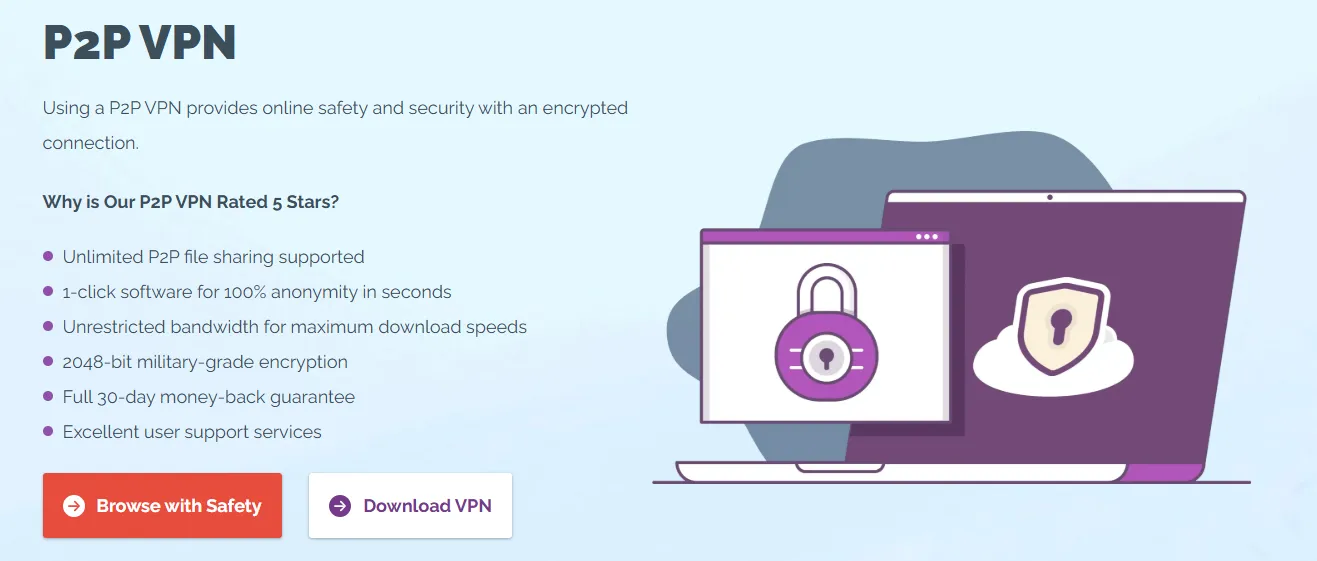
PrivateVPN is open to P2P traffic, supporting P2P traffic on all servers, eliminating the need for users to manually switch to dedicated servers, which greatly facilitates downloaders. To maximize download efficiency, PrivateVPN keeps port forwarding functionality always active on all servers, which is crucial for improving torrenting speeds.
According to technical specifications from the customer service team, regular servers are restricted to only 1 open port, while users who purchase a Dedicated IP can open "virtually all" required ports. Theoretically, this port configuration flexibility should lead to faster torrenting speeds for Dedicated IP users.
Combined with its military-grade encryption, strict No-Logs Policy, and Kill Switch feature, PrivateVPN ensures that users benefit from the following protections when downloading and sharing files:
-
Perfect Anonymity: Hides true IP address, location, and activity, effectively evading monitoring by ISPs, governments, and malicious hackers.
-
Public Network Security: Ensures the safety of private and financial data even when conducting P2P activities on unsecured Wi-Fi networks.
-
Resistance to Traffic Censorship: Users can safely share files without worrying about interception.
-
Comprehensive Protection: Ensures that all types of files sent and received (including messages, images, and videos) maintain 100% privacy throughout the entire transmission process.
Legal Disclaimer: Torrenting technology is legal in most places globally, but downloading and sharing copyrighted content is illegal. Our team does not condone any illegal activities. Before starting P2P downloads, please be sure to read and comply with the laws and regulations in your jurisdiction. Overall, PrivateVPN remains one of the best torrenting VPNs on the market for securing P2P networks.
PrivateVPN Global Server Network Size and Regional Distribution (63 Countries)

PrivateVPN employs a "small but focused" strategy, prioritizing server quality over quantity, which is key to maintaining its excellent streaming unblocking capabilities.
1. Server Network Size and Global Distribution
PrivateVPN has deployed over 200 servers in 63 countries/regions globally. Although the number is lower than industry giants, its IP resources are rich, with a total of over 7,000 IP addresses. This means that even if a single IP becomes saturated, the system will automatically allocate another IP, ensuring the user's connection experience.
2. Virtual Servers and Infrastructure
-
Virtual Servers (Virtual Locations): PrivateVPN has only 7 virtual servers, meaning the actual physical location of the server differs from the displayed IP address region. This poses no security risk, but it may affect connection speed if the distance between the server and the user is greater than expected. These 7 virtual servers are located in: Argentina, Chile, Colombia, Bangalore, Mexico City, Panama City, and Lima.
-
Infrastructure Composition: The majority of PrivateVPN's servers are rented. While most VPNs adopt this approach to reduce proprietary costs, renting servers does not threaten user privacy as long as the VPN enforces a reliable No-Logs Policy. Confirmation via live chat customer service revealed that PrivateVPN does own a portion of its proprietary servers, which adds control over its infrastructure and provides greater reassurance.
3. Dedicated IP Address Service
PrivateVPN offers 15 Dedicated IP address options, covering 14 countries. This is a valuable add-on service for users who require a stable IP address (e.g., for accessing bank accounts or running online services). Dedicated IPs ensure connection stability and consistency.
Conclusion: PrivateVPN's server network is relatively balanced in geographical coverage, strategically covering all major regions. Although it lacks advanced RAM-only technology, its reliable connections, rich IP address resources, and clear virtual server disclosure make its network performance satisfactory.
PrivateVPN Usage in Mainland China: How to Bypass the Great Firewall?
Given that Mainland China implements strict and continuous regulatory measures on VPN technology, PrivateVPN, like most providers, cannot offer a 100% connection guarantee. Nevertheless, through specific configurations and strategies, PrivateVPN still has a chance to operate within the Great Firewall of China (GFW).
1. Connection Strategy and Usage Advice
To maximize the success rate of connections, we provide the following advice based on testing and user feedback:
-
Download and Install in Advance: Due to network restrictions within Mainland China, VPN official websites and app stores are often inaccessible. It is highly recommended that you complete the download and installation of the PrivateVPN client on all required devices before arriving in Mainland China.
-
Enable the Stealth Feature: This is key to successful connection in Mainland China. Users must select the OpenVPN protocol and enable the Stealth feature (also known as Scramble Obfuscation mode). This function disguises VPN traffic, making it look like regular HTTPS traffic, thereby effectively circumventing the blocking caused by Deep Packet Inspection (DPI).
-
Preferred Server Nodes: In terms of server selection, connecting to the Hong Kong server, which is geographically close to China, usually yields the best speed and connection stability. Our tests found that using the Hong Kong node resulted in faster speeds than other long-distance nodes. Other Asian nodes like Japan and Singapore are also worth trying as alternatives.
2. Legal and Risk Advisory
While the Chinese government continuously tightens its blocking and regulation of VPN technology, enforcement is primarily directed at the VPN service provider, rather than tracing or penalizing individual users. Nevertheless, our team always emphasizes legality and compliance. Before using any VPN service, you must fully understand and comply with the local laws and regulations in your country or region. We do not condone any illegal activities.
PrivateVPN Client Experience, Device Compatibility, and Installation Guide

PrivateVPN provides applications across major platforms, designed to be minimalist and easy to operate. Despite this, it still has room for improvement in device compatibility, and there are significant functional differences across platforms.
1. Application Design and Platform Differences
PrivateVPN's application interface is clean and easy to navigate, allowing users to sort servers alphabetically or by distance. Due to its moderate server network size, the application lacks many competitors' "Smart Selection" or "Best Server" auto-connect features. However, users can easily create a server favorites list.
The table below shows the key functional differences between the various application versions:
|
Client Version |
Compatible System Requirements |
Key Features and Functions |
Missing Features or Limitations |
|
Windows |
Windows 7 and above |
Full feature set, all protocols, Exclusive App Guard. |
None |
|
Mac |
MacOS 10.12 and above |
Almost all features, including Kill Switch. |
Lacks PPTP protocol. |
|
Android |
Android 4.0 and above |
Full feature set, includes Split Tunneling. |
Only supports OpenVPN TCP and UDP protocols, missing App Guard. |
|
iOS |
iOS 10.0 and above |
Simple design. |
Minimal protocols (IKEv2 only), missing Kill Switch security switch, does not support auto-start. |
2. Insufficient Compatibility and Missing Features
Although PrivateVPN's core applications run well, it lags behind major competitors in terms of extended compatibility:
-
Linux Support: PrivateVPN does not offer a dedicated Linux client, not even a Command-Line Interface (CLI) version. Users need to manually configure the connection to PrivateVPN servers, which is overly complex for non-technical users.
-
Browser Extensions: It does not provide fully functional browser extensions (like those available from ExpressVPN), only allowing users to configure PrivateVPN's proxy server in the browser, which cannot achieve advanced functions like one-click server switching.
-
Missing Smart DNS: PrivateVPN does not have a Smart DNS service. This means devices that are incompatible with VPN clients, such as Xbox, PS, Nintendo Switch, or some smart TVs, must connect to a router pre-installed with PrivateVPN to achieve encryption. Many users would welcome the addition of Smart DNS for a more convenient connection method.
Commendably, PrivateVPN offers a fully functional Firestick application, and the supported server count is consistent with the desktop version, which is a significant bonus for streaming enthusiasts.
3. Simultaneous Connections and Installation Experience
-
Generous Connection Limit: PrivateVPN supports up to 10 simultaneous connections, which is a high standard in the VPN industry. Actual tests showed that simultaneously streaming HD content on multiple devices (e.g., laptop, phone, tablet) did not affect connection speed or picture quality, demonstrating stable performance.
-
Setup and Installation (Ease of Use):
-
Native App Installation: For compatible devices like Windows, Mac, mobile phones, and Firestick, the installation process is extremely simple, requiring only downloading the installer and following the instructions, which can be completed in minutes.
- Router Installation: For gaming consoles and smart TVs that do not support clients, PrivateVPN is compatible with various routers (such as ASUS RT, DD-WRT, Tomato, etc.), but the configuration process is complex and may carry risks, so users must proceed with caution.
-
Quick Guide: Install PrivateVPN in Just 3 Steps:
-
Register a PrivateVPN account.
-
Download the installation file compatible with your operating system and install it.
-
Launch the application, enter your login credentials, and connect to a server.
PrivateVPN Pricing and Customer Support
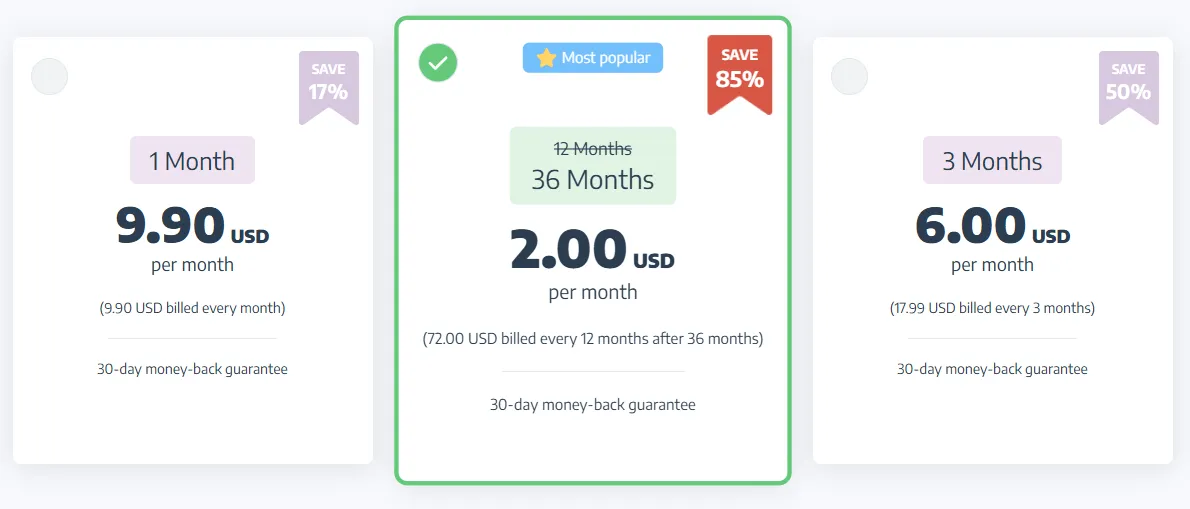
PrivateVPN Pricing Snapshot
|
Plan Type |
Approximate Price Range |
Key Features |
Money-Back Guarantee |
|
1 Month |
~ $9.99/month |
High flexibility, most expensive price. |
30-day refund guarantee |
|
3 Months |
~ $6.00/month |
Save about 50%, moderate value. |
30-day refund guarantee |
|
36 Months |
~ $2.00/month |
Best value choice, most competitive pricing. |
30-day refund guarantee |
1. Value for Money Analysis
PrivateVPN's long-term plans (such as the three-year plan) remain highly competitive in 2025. Considering its strong streaming unblocking capability and reliable security, its price is generally lower than top competitors like ExpressVPN or NordVPN, offering an excellent feature-to-price ratio. All plans offer a 30-day money-back guarantee, allowing users to try it risk-free.
2. Customer Support and User Experience
PrivateVPN has consistently adhered to a "Human-Powered" principle in its customer support, which is rare and commendable in the VPN industry.
-
24/7 Live Chat: PrivateVPN provides around-the-clock live chat support, and responses are usually received within minutes.
-
High-Caliber Technical Support: Their support team is not outsourced but consists of professional network engineers and technical experts. This means that when users consult on complex technical issues (such as manual router configuration, obfuscation mode troubleshooting), they can receive precise and professional assistance, rather than templated responses.
-
Troubleshooting and Resources: If live chat cannot resolve the issue, users can receive more in-depth support through a ticket system. Additionally, PrivateVPN's official website offers a comprehensive knowledge base and setup guides, covering installation tutorials for all major platforms and protocols.
Conclusion and Purchase Recommendation
PrivateVPN is a 'compact yet powerful' VPN, and its performance in 2025 confirms it remains a high-value option. Having successfully integrated WireGuard, it maintains its competitive edge in the privacy sector, thanks to its strong streaming unblocking capabilities and P2P-friendly support.
1. Quick Summary
|
Pros |
Cons |
|
Streaming King: Reliably unblocks Netflix, Hulu, BBC iPlayer, etc. |
Lacks Audit: No independent third-party verification of the No-Logs Policy. |
|
Generous Connections: Supports up to 10 simultaneous devices. |
Speed Volatility: Some long-distance nodes (like France) are extremely slow. |
|
P2P Expert: All servers support P2P, with port forwarding always active. |
Weak Compatibility: No dedicated Linux client or Smart DNS. |
|
High Security: Military-grade encryption + Kill Switch + Obfuscation mode. |
Missing Features: Lacks advanced features like Double VPN (Multi-hop). |
2. Who is PrivateVPN For?
PrivateVPN is suitable for users with a limited budget whose primary needs are streaming and secure P2P downloading. If you need a service that can reliably watch global content and protect the privacy of multiple home devices, PrivateVPN is an extremely cost-effective choice.
-
Recommended Users: Streaming enthusiasts, P2P/torrenting users, large families (needing 10 connections).
-
Users Who Should Avoid: Linux users, those with extremely high demands for speed stability, and gaming console users requiring Smart DNS.
Frequently Asked Questions (FAQ)
Q1: Is PrivateVPN really "secure"? It doesn't have a third-party audit.
Yes, PrivateVPN is reliable in terms of fundamental security.
-
Security Assurance: It uses military-grade AES-256 encryption and provides a Kill Switch and Stealth VPN (Obfuscation mode) to prevent IP leaks and bypass censorship.
-
Privacy Risk: Its headquarters are in Sweden (privacy-focused), and it commits to a strict No-Logs Policy. However, because it has not undergone an independent third-party security audit, users must trust its no-logs commitment based on its long-standing good reputation.
Q2: Does PrivateVPN support the latest WireGuard protocol?
Yes, it does. PrivateVPN integrated the WireGuard protocol into its applications in 2025.
-
Advantage: WireGuard offers faster speeds, more streamlined code, and lower latency than traditional OpenVPN, thereby improving the overall user connection experience while maintaining security.
Q3: Can PrivateVPN unblock Netflix and other streaming platforms?
Yes, and its performance is excellent. Streaming unblocking capability is one of PrivateVPN's core strengths.
-
Platforms Unlocked: It can reliably unblock Netflix US/UK/JP, Hulu, Disney+, Amazon Prime Video, and BBC iPlayer, among others.
-
Tip: When connecting, select server nodes labeled as "streaming-optimized" in the application for a higher success rate.
Q4: Can PrivateVPN be used in Mainland China?
Yes, but a 100% connection guarantee cannot be offered.
-
Key Feature: You must manually switch to the OpenVPN protocol and enable the Stealth (Obfuscation) feature.
-
Connection Tip: It is recommended to prioritize connecting to nearby servers in Hong Kong, Japan, or Singapore. Be sure the application is updated to the latest version before connecting.
Q5: How many devices can PrivateVPN connect simultaneously?
PrivateVPN offers one of the most generous connection counts in the industry, supporting 10 simultaneous connections.
-
Device Types: You can use one account on 10 devices simultaneously, whether Windows, Mac, iOS, Android, or Firestick.
-
Target Audience: This is a huge advantage for family users or those with a large number of digital devices.