Many users rely on Virtual Private Networks (VPNs) to ensure online privacy and data security. However, a common pain point is the significant drop in network speed and increased data transmission time once a VPN is connected.
Additionally, users often lose access to local devices at home or the office (like network printers or LAN file shares). This "security vs. efficiency" dilemma severely impacts the daily user experience.
VPN Split Tunneling is a key feature designed precisely to solve this balancing act. It allows users to "split" their traffic, ensuring both secure encryption and efficient connectivity.
This article will provide an in-depth analysis of what VPN Split Tunneling is, its ingenious working principles, various implementation techniques, and the critical pros, cons, and mitigation strategies users must understand.
VPN Split Tunneling Definition
What is Split Tunneling?
VPN Split Tunneling is an advanced VPN feature designed to address the decreased network performance and restricted local network access inherent in the traditional VPN "Full Tunneling" mode, where all traffic must pass through the encrypted tunnel.
It allows users to intelligently choose which data traffic should pass through the secure VPN tunnel and which can bypass the VPN to access the open internet directly.
|
Feature |
Full Tunneling |
Split Tunneling |
|
Encryption |
100% of traffic |
Selective traffic |
|
Speed |
Often slower (High overhead) |
Maximized for direct traffic |
|
Privacy |
Maximum (Full anonymity) |
Partial (Real IP visible for some apps) |
|
Local Access |
Often blocked (Printers/LAN) |
Seamless access to local devices |
The value of split tunneling lies in providing users with flexible control, allowing them to find the optimal balance between Data Security and Network Speed and Convenience.
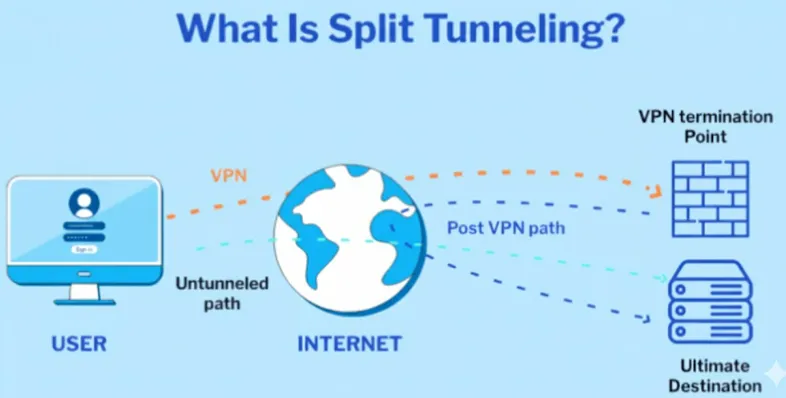
Key Types of Split Tunneling
|
Type |
Mechanism |
Advantages and Features |
|
App Inclusion Mode (Whitelist) |
Default traffic bypasses the VPN. Only encrypts specific applications you manually add to the list (e.g., banking apps). |
Maximizes local network speed, only protecting the most sensitive traffic. |
|
App Exclusion Mode (Blacklist/Reverse Tunneling) |
Default traffic goes through the VPN. Only excludes applications you manually add to the list (e.g., local printer, streaming services). |
Provides comprehensive encryption by default, improving performance for specific services when needed. |
|
Dynamic Split Tunneling |
Does not rely on manual lists. Uses DNS protocol or real-time analysis to automatically determine the sensitivity of traffic types and destination domains, routing them dynamically. |
Simplifies management, providing a smarter and more seamless experience. |
|
Dual-Stack Leak (Accidental Leakage) |
Occurs when the device supports both IPv4 and IPv6, but the VPN client is configured for IPv4 tunneling only. |
Serious Risk: All IPv6 traffic bypasses VPN encryption, leading to an IPv6 leak. This configuration must be avoided. |
VPN Split Tunneling Working Principle
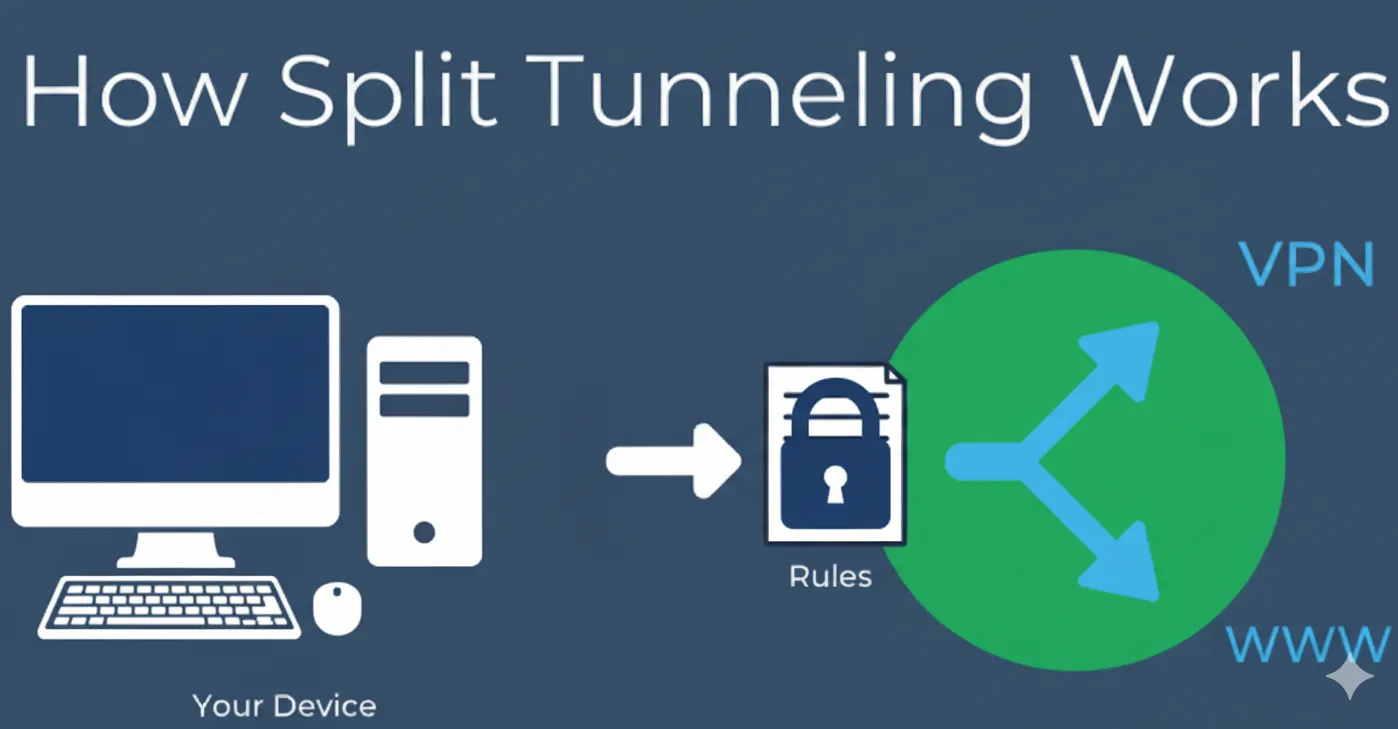
The core of split tunneling is the VPN client software acting as a "traffic manager," achieving intelligent traffic splitting by precisely controlling the operating system's Routing Table.
1. Traffic Interception & Policy Check
The VPN client software, after the initial split tunneling configuration, acts as a traffic interceptor. When any network application generates an outbound data packet, the client immediately intercepts it. It checks the user-defined split tunneling policy (app inclusion, exclusion, or IP rules) and determines whether the data packet's source and destination meet the VPN tunnel criteria. This decision point is what differentiates split tunneling from the traditional "all-or-nothing" routing method.
2. Data Encryption and Tunnel Encapsulation
For any data packet that matches the VPN tunnel rules, the client immediately performs the following two steps:
-
Encryption: The data payload is encrypted using military-grade algorithms (such as AES, SHA2, RSA, etc.) to prevent external snooping while the packet is transmitted over the public network.
-
Encapsulation: The client encapsulates the original encrypted data packet within a new, standardized protocol header (such as OpenVPN or IPSec). This process hides your device's real IP address and ensures the secure transmission of the packet within the tunnel.
3. Routing Table Instruction Injection
The VPN client creates a virtual network interface in the operating system and dynamically injects new routing rules:
-
Tunnel Route (VPN Traffic): Forces all encrypted and encapsulated data packets to be directed to the virtual VPN interface.
-
Direct Route (Non-VPN Traffic): Directs traffic from all excluded IP addresses, application processes, or local network segments (such as 192.168.x.x) to the physical network interface (such as Wi-Fi or Ethernet).
💡 Key Point: The routing table is a kernel-level instruction set that tells the computer, "Data packets going to address X should use interface Y." Split tunneling modifies these instructions to achieve precise traffic splitting.
4. Transmission to VPN Server
-
Secure Transmission: The encapsulated VPN data packets utilize the encrypted tunneling protocol (like OpenVPN, IPSec) to leave your local network and reach the remote VPN server. The communication traverses the public internet but remains private due to encryption and encapsulation.
-
Decryption and Forwarding: Upon receiving the encapsulated packet, the VPN server first strips the tunnel header to extract the original encrypted payload, then uses its private key to decrypt the data. Finally, the server forwards the now-decrypted data packet to its original public internet destination.
5. Direct Internet Routing
Any data packet that does not match the VPN tunnel rules completely skips the encryption and encapsulation steps. This non-VPN traffic simply takes the default route, sent directly to the open internet through your local ISP. In this case, your Internet Service Provider will see the traffic as originating directly from your real IP address, without the concealment and protection of the VPN. The true source of your encrypted VPN traffic, however, remains securely hidden by the remote tunnel endpoint.
VPN Split Tunneling Advantages (Pros)
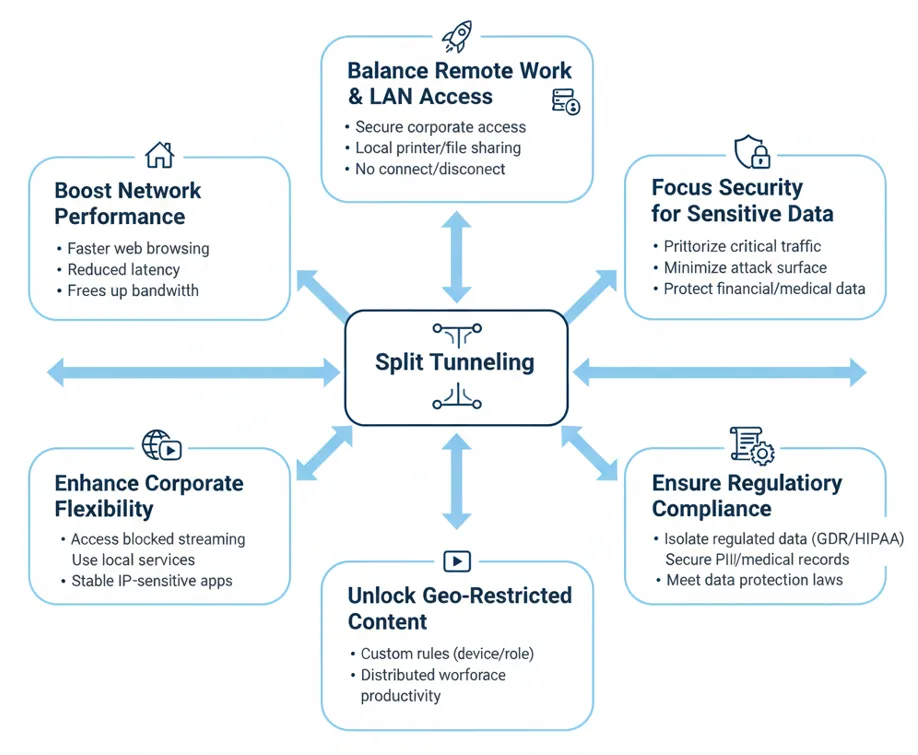
Split tunneling can significantly enhance the user experience by prioritizing efficiency where maximum security is not required.
1. Boost Network Performance & Bandwidth
Split tunneling technology can significantly accelerate network connections, especially for general web browsing and large file transfers that don't require encryption. By allowing non-sensitive data to bypass the VPN tunnel via the local Internet Service Provider (ISP), it avoids the repetitive encryption/decryption process and unnecessary geographic hops at the VPN server, thus effectively reducing Latency and data packet processing load. This not only speeds up general internet activity but also frees up valuable bandwidth resources provided by the VPN service.
2. Balance Remote Work and Local Network Access (LAN)
Remote workers can establish a dedicated, secure encrypted tunnel for accessing corporate internal network resources (such as proprietary file systems and internal mail servers) to meet security and compliance requirements. Simultaneously, they can easily use local home or office network devices, such as wireless printers or local area network file shares (NAS). Split tunneling eliminates the tedious need to constantly connect and disconnect the VPN when switching between work mode and local access, promoting high-performance remote access.
3. Focus Security for Sensitive Data
Split tunneling policies allow organizations and individuals to concentrate the highest security resources and inspection capabilities on the most critical traffic. By routing only applications involved in financial transactions, medical communications, or corporate proprietary data transfer to the encrypted tunnel, the VPN's overall attack surface is minimized. This refined management approach ensures that security efforts are focused where they matter most, enhancing the overall protection level for sensitive data.
4. Unlock Geo-Restricted Content
Users can simultaneously enjoy geographically restricted online content and services that rely on a local IP address. For example, while traveling abroad, you can use the VPN to connect back to your home country to access a restricted streaming content library, while using local search engines or banking applications directly, ensuring these IP-sensitive services run stably and quickly, avoiding access failures or downgrades caused by a VPN IP address.
5. Enhance Corporate Operational Flexibility
Split tunneling is a key enabler for the modern distributed office model—"Operate from Anywhere" (WFA). Companies can customize different tunneling rules based on device type (company-issued vs. employee personal device) or user role, maximizing the productivity and network performance of a distributed digital workforce while maintaining corporate security policies. This offers flexibility and control for managing globally dispersed digital labor.
6. Ensure Regulatory Compliance
As global data privacy regulations (such as the EU's GDPR and the US's HIPAA) continue to evolve, organizations must have precise control over sensitive data transmission paths. Split tunneling allows users and enterprises to mandatorily isolate regulated traffic (such as data containing Personally Identifiable Information or medical records) within the encrypted VPN tunnel, ensuring this data does not flow over unprotected local ISP paths. This granular isolation of traffic greatly simplifies the process for enterprises to meet complex regional or industry data protection compliance.
7. Extend Battery Life on Smartphones and iPads
Split tunneling conserves power by allowing you to choose which apps use the VPN and which access the internet directly.
-
Reduced CPU usage: By routing only sensitive traffic (e.g., banking apps or work emails) through the VPN, your device's main processor doesn't have to work as hard to encrypt non-sensitive traffic (e.g., streaming services, general browsing).
-
Less data processing: Directing high-bandwidth activities like video streaming or large downloads to bypass the VPN decreases the overall amount of data being processed by the VPN tunnel.
- Lower network resource consumption: The reduction in encryption overhead and data routing minimizes overall network resource consumption, resulting in better battery life.
VPN Split Tunneling Disadvantages and Risks (Cons)
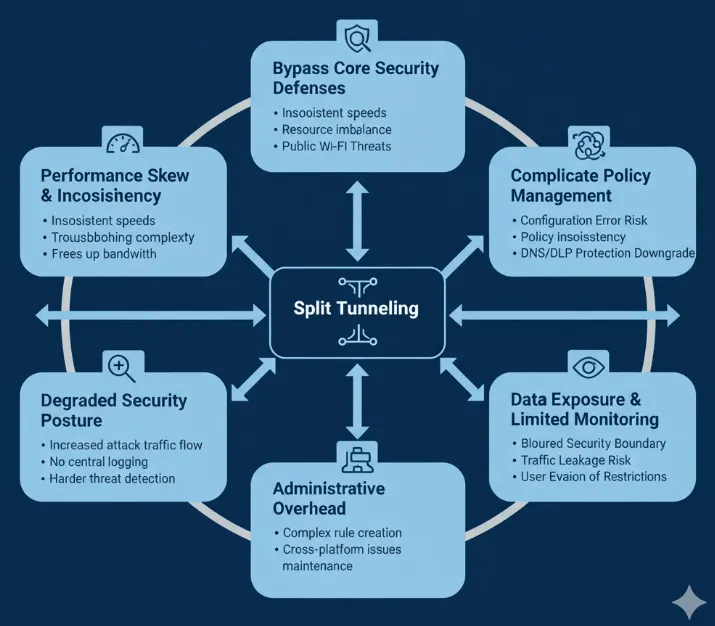
However, this efficiency comes at a cost: the feature inherently sacrifices visibility and control over some traffic, which introduces significant security vulnerabilities and increases administrative complexity.
1. Bypass Core Security Defenses
Splitting some traffic away from the encrypted tunnel means these data streams completely bypass various in-depth security inspection systems deployed at the corporate network perimeter.
-
Central Inspection Void: Traditional full-tunneling mode allows all user traffic to pass through the company firewall, Intrusion Prevention System (IPS), and security proxies for centralized inspection. Split traffic cannot undergo Deep Packet Inspection (DPI), missing opportunities to identify and block known malware, phishing sites, or inappropriate content.
-
Heightened Endpoint Risk: Once an attacker compromises a remote employee's computer via malware, they will leverage the device's trust in the internal network to launch lateral attacks. If the malware's Command and Control (C&C) communication is routed to the local ISP, the corporate security team will be unable to detect it, allowing the intrusion activity to proceed unseen.
-
Public Wi-Fi Threats: In unprotected public Wi-Fi environments (cafes, airports, hotels), split traffic is exposed in an unencrypted environment, making it highly vulnerable to local sniffing, Man-in-the-Middle (MITM) attacks, or protocol attacks from hostile devices on the same network.
2. Complicate Policy Management
Compared to a simple "all-or-nothing" full-tunneling policy, implementing split tunneling introduces greater complexity and challenges for policy management and maintenance.
-
Configuration Error Risk: Administrators need to meticulously define and continuously maintain complex routing rules and application whitelists/blacklists. Any configuration error—such as accidentally adding an internal database access address to the non-encrypted path—could result in sensitive corporate data being exposed to the external network without protection.
-
Policy Inconsistency: Remote working environments involve various operating systems and devices (Windows, macOS, iOS, Android). Enforcing a unified and flawless split tunneling policy across all these platforms is extremely difficult, easily leaving security blind spots due to device or version discrepancies.
-
DNS/DLP Protection Downgrade: Split rules or user configuration may allow traffic to bypass corporate DNS filtering services and Data Loss Prevention (DLP) devices. This bypass has two critical security implications: first, bypassing DNS prevents the company from blocking access to malicious or flagged domains; second, bypassing DLP renders the organization unable to monitor and block the unauthorized exfiltration of sensitive information (such as customer lists or source code) from the corporate network.
3. Data Exposure and Limited User Monitoring
Split traffic flows transparently to the ISP, making user behavior a "black box" to the corporate security team.
-
Blurred Security Boundary: Non-work-related websites accessed by employees during work hours (e.g., streaming, social media) bypass corporate network monitoring, reducing the ability to regulate productivity. More critically, if the system is already compromised, the attacker's communication with the C&C server becomes invisible due to splitting.
-
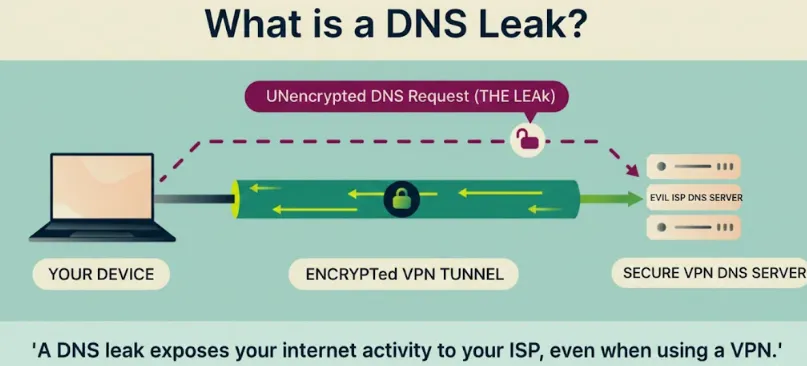
Traffic Leakage Risk: Unencrypted traffic exposes the user's real geolocation, browsing history, and DNS query records to the local ISP.
-
User Evasion of Restrictions: Split tunneling offers a simple path for users seeking to bypass company content restrictions, making it difficult for the company to regulate and track employee network usage.
Mitigation Strategies for VPN Split Tunneling Risks
To enjoy the convenience of split tunneling while minimizing the associated risks, users and enterprises can adopt a layered defense strategy.
1. Reinforce Endpoint and Network Edge Protection
To counter the risk of traffic bypassing central defenses and malware C&C communication:
-
Enforce Zero Trust Principle: Irrespective of whether traffic goes through the VPN tunnel, all requests to access company resources must undergo strict identity verification, authorization, and device health checks.
-
Deploy Endpoint Detection and Response (EDR/XDR): Mandate the deployment of advanced endpoint security solutions on remote devices. EDR/XDR can discover and respond to malicious C&C communication directly on the endpoint, independent of the network perimeter, compensating for the VPN link's visibility blind spot.
-
Strict Public Network Split Policy: For public or insecure Wi-Fi networks, you should disable App Exclusion Mode or implement the most stringent traffic control, allowing only a minimal amount of necessary non-sensitive traffic to be split.
-
Enable VPN Kill Switch: Ensure that if the VPN connection drops unexpectedly, all traffic is immediately blocked, preventing traffic from being briefly exposed to the local ISP during the routing switch.
2. Mitigate Configuration Complexity
To solve the problems of configuration errors and cross-platform policy inconsistency:
-
Prioritize "Inclusion Mode" and Whitelisting: In an enterprise environment, it is strongly recommended to use App Inclusion Mode (whitelisting). This method routes only explicitly listed sensitive or internal traffic through the VPN, excluding all other undefined traffic by default, fundamentally reducing the risk of sensitive data leakage.
-
Centralized Policy Management: Utilize Unified Endpoint Management (UEM) or enterprise-grade VPN platforms to centrally manage and distribute split tunneling rules. Ensure consistency across all operating systems and devices, and conduct regular audits to eliminate any configuration errors that could lead to data leakage.
-
Pre-Deployment Policy Testing: Before formally deploying a split tunneling policy, conduct rigorous regression testing against critical business applications (e.g., internal mail, DLP, DNS filtering) to verify that the split rules are working correctly and that no security defenses are accidentally bypassed.
3. Mitigate Data Exposure and Leaks
To address DNS leaks and limited traffic visibility:
-
Enforce DNS Protection: Ensure the VPN client's DNS protection feature is enabled, and that encrypted traffic, even in split tunneling mode, uses the VPN's dedicated DNS server, not the local ISP's server.
-
Select Modern Protocols and IPv6 Protection: Prioritize clients that support modern VPN protocols like WireGuard, which often manage routing at the kernel level and are more stable. Simultaneously, the client must be validated to provide robust IPv6 leak protection mechanisms.
-
Routine Leak Testing: Users should get into the habit of using third-party online tools to perform IP, DNS, and IPv6 leak tests while connected to the VPN with split tunneling enabled, as a final line of defense for personal privacy protection.
Why Gamers Love Split Tunneling?
Gamers love split tunneling because it offers the best of both worlds: maximum speed for gaming by routing it outside the VPN tunnel, reducing lag, while still using the VPN for other apps to keep sensitive data secure, balancing performance with privacy and security without sacrificing either. It lowers latency, prevents bandwidth throttling, and provides direct access to game servers, all while protecting your general browsing or streaming with encryption, making it a crucial tool for competitive play.
Key Benefits for Gamers
- Reduced Lag & Ping: By bypassing the VPN's encryption overhead, your game traffic takes a more direct, faster route to the server, crucial for competitive games where milliseconds matter.
-
Improved Bandwidth: It prevents the VPN from slowing down data-heavy games, ensuring smooth gameplay without bottlenecks.
-
Best of Both Worlds: You get the security of a VPN for your web browsing, streaming, or downloads, while your game runs unprotected but faster, giving you control over what traffic gets encrypted.
- Access Local Resources: It allows gaming apps to bypass the VPN while still letting you access local network devices like printers or other servers directly.
-
Bypass Blocks: Some services block VPNs; split tunneling lets you route your game outside the VPN to access it, while keeping other activities protected.
How it Works
- Normal VPN: All your internet traffic (games, browsing, apps) goes through the encrypted VPN tunnel.
-
With Split Tunneling: You tell your VPN which apps (like your game client) should use your regular internet connection, while other apps (like your browser) stay within the encrypted VPN tunnel.
How to Set Up VPN Split Tunneling (Operational Guide)

Most mainstream VPN clients have built-in, easy-to-use split tunneling functionality.
General Setup Steps:
-
Open VPN Client Settings: Launch your VPN application and navigate to the "Settings" or "Options" menu.
-
Locate Split Tunneling Option: Look for an option labeled "Split Tunneling," "App Exclusion," or "Custom Routing."
-
Enable and Select Mode: Enable the feature and choose either the App Inclusion or App Exclusion mode based on your needs.
-
Add/Remove Applications or Websites: Use the client list to add the specific programs or URLs that should go through the VPN or be excluded.
-
Save Settings and Reconnect VPN: Save your configuration changes and reconnect the VPN for the new split tunneling rules to take effect.
-
Verify Split Effect: Use a VPN-routed application (e.g., a browser) to query your IP address; then use an excluded application to query your IP address. If the two IP addresses are different, the split tunneling setup is successful.
Setup and Safety Checklist
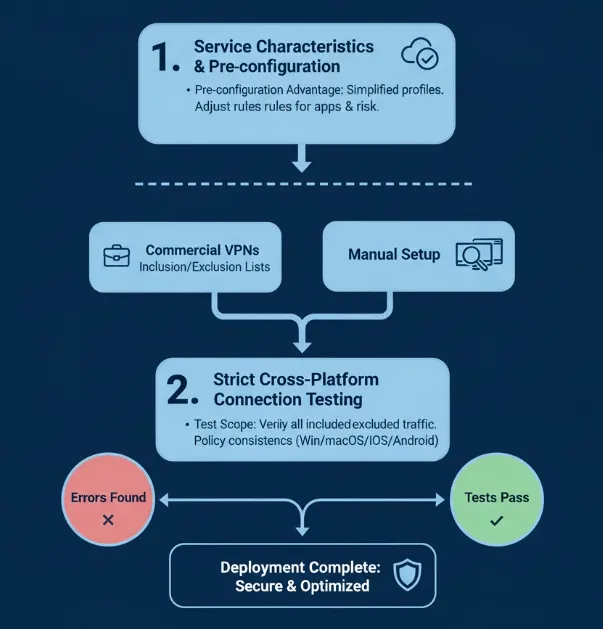
Before actually deploying a split tunneling policy, it is crucial to understand the characteristics of different services and conduct thorough connection testing.
1. Service Characteristics and Pre-configuration
Some VPN services, such as commercial solutions for remote work (like Cisco Anyconnect, etc.), may offer simplified configuration processes or pre-defined profiles.
-
Pre-configuration Advantage: Pre-configured split tunneling profiles for common use cases like streaming or VoIP calls can significantly simplify the initial setup.
-
Personalized Customization: Despite pre-configurations, you should still meticulously customize and adjust the rules based on your organization's unique applications, resource access requirements, and acceptable risk tolerance.
2. Strict Cross-Platform Connection Testing
Once configured, the split tunneling rules must undergo comprehensive, cross-platform connection testing on all target devices.
-
Test Scope: Verify all "included" and "excluded" applications and observe whether their VPN and non-VPN behavior aligns with expectations.
-
Key Verification Points: Check for consistency in policy enforcement across all platforms (Windows, macOS, iOS, and Android). Promptly identify any connection drops, routing errors, or traffic leakage issues to ensure the reliability of the split tunneling policy.
Split Tunneling Troubleshooting Tips
Correctly configuring split tunneling can involve complex routing and network stack interactions, making troubleshooting critical. Here are diagnostics and solutions for common problems.
1. Unstable or Failed Application Connections
When an application cannot connect or connects intermittently with split tunneling enabled, it is usually related to improper routing rule configuration.
-
Verify Rule Precision: Carefully check your configured routing rules to ensure the application name, target URL, or IP address range (CIDR block) is entirely correct; any spelling mistake can lead to traffic being incorrectly routed.
-
Refresh Routing Table: After making any changes to routing rules, be sure to try closing and reopening the VPN connection to ensure the VPN client reloads and applies the latest rules.
-
Permissions and Firewall: Confirm that the VPN application has the necessary permissions on your operating system to modify network routing. Temporarily disable any third-party firewall or security software to rule out them blocking traffic.
-
Protocol Switching: If a specific connection fails to establish, consider switching the VPN protocol from the default UDP to TCP to benefit from TCP's reliable transmission mechanism.
2. Sensitive Traffic Leakage and Privacy Risk
If unencrypted sensitive application traffic is detected bypassing the VPN tunnel, it indicates a risk of privacy exposure.
-
Rule Audit and Reverse Strategy: Re-audit your rules to ensure sensitive applications are explicitly routed through the VPN tunnel. If the configuration is complex, consider switching to Reverse Split Tunneling (Exclusion Mode), where all traffic is routed through the VPN by default, and only low-risk public traffic is excluded.
-
Leak Testing Tools: Actively use professional VPN leak testing tools (such as DNS/IP leak detection websites) to identify any traffic that should be encrypted but is not.
-
Program-Level Binding: At the operating system (OS) level, try to forcibly bind specific applications or browsers to the VPN adapter, enforcing tunneling at the program launch layer.
3. Inconsistent Policy Execution or Evasion Risks
When split tunneling policies are executed inconsistently across different devices or are easily bypassed, system-level or architectural adjustments are required.
-
Client Consistency: Check that the VPN client version and configuration are consistent across all devices (Windows, Mac, mobile).
-
OS-Level Policies: Consider configuring split routing at the operating system level (rather than solely relying on the VPN client) to ensure that all applications adhere to a consistent policy.
-
DNS Leak Protection: If traffic routing is based on domain names, you must enable DNS Leak Protection on the VPN to prevent DNS queries from bypassing the tunnel and thereby evading routing rules.
-
Corporate Enforcement: For corporate networks, mechanisms like Endpoint Agents and Network Access Control (NAC) should be used to force employees to comply with preset routing rules, preventing unauthorized policy modifications.
-
Mobile Device Optimization: On mobile devices, enable the "Always-On VPN" connection setting to prevent policy failure after switching between Wi-Fi/cellular networks or restarting.
Continuous Monitoring and Policy Updates
Split tunneling policy is not a "set-it-and-forget-it" configuration; it requires continuous monitoring and adaptive adjustment to cope with the ever-changing network environment and application ecosystem.
Traffic Logging and Auditing
-
Logging and Inspection: Regularly log and inspect VPN traffic logs to promptly identify application traffic and data flows that were not encrypted due to routing errors.
-
Time-Based Auditing: As new applications and network services constantly emerge over time, auditing helps uncover unexpected traffic paths and maintain security compliance.
-
Rule Review and Updates: Review and update your routing rules at least quarterly to incorporate new applications, respond to changing business needs, or address new security threats.
Dynamic Rule Maintenance
-
Provider Dependency: If you rely on the VPN provider's domain categories or application profiles, be sure to regularly check that these profiles remain up to date.
-
Automated Management: For complex enterprise-level split tunneling policies, the use of automation tools is highly recommended to simplify management processes and reduce errors that might occur during manual configuration and maintenance.
Practical Application: When to Use It (And When to Avoid It)

A. Scenarios Where Split Tunneling is Ideal
-
Streaming & P2P: To maximize speed, route high-bandwidth services like Netflix, YouTube, and audio streaming services directly, reserving the VPN connection solely for P2P file sharing that requires anonymity.
-
Gaming: Encrypt general browsing activities, but send latency-sensitive gaming packets directly to minimize lag.
-
Remote Work Optimization: Securely tunnel access to corporate resources and email, but allow high-volume video conferencing or personal web activity to bypass the corporate network link, reducing congestion.
-
Office/Home Users: Must connect to the corporate VPN to access internal resources (e.g., Intranet) but need simultaneous access to a local printer or shared file server.
B. Scenarios Where Full Tunneling is Mandatory (Avoid Split Tunneling)
-
High-Security & Privacy Needs: When handling highly sensitive financial, medical, or proprietary data, or when the goal is maximum anonymity.
-
Public Wi-Fi: When connecting to insecure networks (cafés, airports, hotels), 100% encryption is mandatory to prevent local snooping and lateral attacks from other hostile devices on the same network.
-
High-Risk Devices: If your device has a history of malware or engages in activities prone to attracting malicious intrusions, full tunneling ensures that all command-and-control traffic is rigorously scrutinized by the VPN provider's security tools.
Split Tunneling vs. Inverse Split Tunneling
While the term "Split Tunneling" is often used broadly, there are actually two distinct ways to set it up. Choosing the right one is critical for your security.
-
Regular Split Tunneling (App Inclusion/Whitelist): In this mode, none of your traffic goes through the VPN by default. You must manually "include" specific apps (like your Torrent client or Banking app) that you want to encrypt.
-
Best for: Maximizing speed and local network performance.
-
-
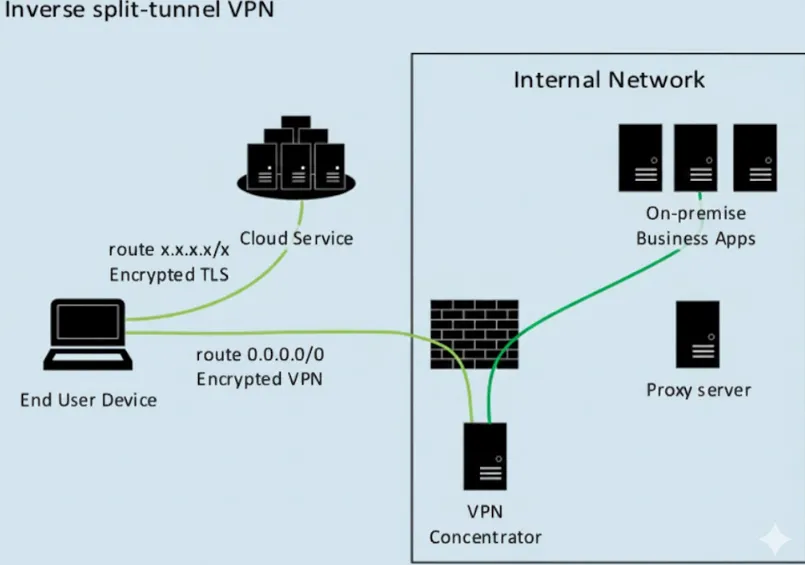
Inverse Split Tunneling (App Exclusion/Blacklist): In this mode, all of your traffic is encrypted by the VPN by default. You manually "exclude" specific apps (like Netflix or a local printer) that you want to bypass the tunnel.
-
Best for: Maximum security and privacy. If you forget to add a new app to the list, it stays protected by default.
-
Step-by-Step: Setting Up Inverse Split Tunneling (2026)
To provide the most value to readers, include a technical setup guide for the most popular platforms.
For Desktop (Windows/macOS)
-
Open VPN Settings: Navigate to the "Options" or "Preferences" menu in your VPN client.
-
Find Split Tunneling: Look for the "Split Tunneling" tab (often under "General" or "Advanced").
-
Select "Exclude" Mode: Choose the option labeled "All apps use the VPN except those I select" (this is the Inverse setup).
-
Add Apps to the List: Click "Add" and browse your computer for applications you want to run at ISP speeds (e.g.,
Spotify.exe,Chrome.exe, or your printer software). -
Restart Connection: Apply changes and restart the VPN for the rules to take effect.
For Mobile (Android)
Note: iOS currently has limited support for app-level split tunneling.
-
Settings Menu: Tap the Gear icon in your VPN app.
-
Advanced Settings: Look for "Split Tunneling."
-
Toggle Exclusion Mode: Ensure the default behavior is "Protect all apps."
-
Select Exclusions: Uncheck the apps you want to bypass the VPN.
-
Verify: Check your IP address in an excluded browser vs. a protected app.
-
-
Conclusion
Split tunneling is a powerful and versatile feature for modern networks. It moves the user past the old trade-off, enabling a strategic balance between robust security for sensitive tasks and maximized performance for everyday activities.
Final Verdict/Recommendation:
Split tunneling is an advanced feature best reserved for experienced users who possess a deep understanding of networking principles and the ability to manage complex routing rules. However, for new users or those prioritizing maximum, absolute security and anonymity, particularly on public networks, the simpler and safer default of full tunneling is the recommended choice.
Before relying on this feature, check your VPN provider’s documentation, ensure they support the type of split tunneling you need, and test your rules thoroughly to verify that sensitive traffic is never inadvertently exposed.
Frequently Asked Questions (FAQ)
Q1: How much does split tunneling help with internet speed?
A: The improvement is usually significant.
It eliminates the unnecessary encryption and decryption processing for all data and avoids extra routing hops. This directly leads to a noticeable reduction in network latency. The effect is most obvious when downloading large files or watching high-definition streaming, as this traffic can be routed directly through the local ISP's high-speed channel.
Q2: Should I enable split tunneling for download tools when doing P2P/torrenting?
A: It is not recommended to enable split tunneling for P2P download tools. P2P/torrenting often involves copyright risks or requires absolute anonymity to hide your real IP address. You should forcibly include the P2P download client within the VPN tunnel to ensure its traffic receives complete encryption and IP masking.
Q3: Why can't my local printer connect after enabling split tunneling?
A: A common reason is that the local network's IP address range was not excluded from the tunnel. The VPN client defaults to treating all non-VPN traffic as external traffic. You need to find the routing rule settings and add the local subnet (e.g., 192.168.1.0/24 or 10.0.0.0/8) as a non-encrypted path to ensure local device communication works properly.
Q4: Do I need to use the VPN or split tunneling for streaming (like Netflix or YouTube)?
A: It depends on your purpose:
-
To access geo-restricted content: You need to include the streaming application or browser within the VPN tunnel, connecting to a server in the target country.
-
To maximize local speed: If you are only watching local content, you can exclude the streaming application from the VPN tunnel to get the fastest connection speed and lowest latency, as encryption and extra routing will slow down local video playback.
Q5: Can split tunneling and a Kill Switch be used together?
A: Yes, and it is strongly recommended to use them together.
The Kill Switch is used to prevent all traffic (including the traffic you originally encrypted) from leaking to the local network if the VPN connection drops unexpectedly.
Split tunneling only manages traffic routing during normal operation. The Kill Switch provides an extra layer of security, ensuring that encrypted traffic is not exposed during a connection interruption, even when in split tunneling mode.
Q6: Does Split Tunneling Affect Ping in Gaming?
A:Yes, split tunneling can significantly help reduce ping in gaming by routing only your game traffic through the VPN while letting other apps bypass it, offering a more direct path to game servers for lower latency, though sometimes the VPN's inherent overhead can add a slight amount of ping. It's ideal for balancing security (VPN for browsing) with performance (direct connection for gaming).